Inside a Real-Time Voice AI Agent: How We Built a Recruiter That Can Listen, Think, and Decide
Recruiting looks simple from outside. The process looks quite straightforward: speak to candidates, ask a set of questions, gather relevant information, and decide who moves forward.
But in reality, screening is one of the most repetitive yet important steps of hiring.
Recruiters need to assess candidates consistently and capture the right information, often across hundreds or thousands of applications.
That makes it an obvious area for automation but automating a real conversation is far more complex than automating a checklist.
Once an AI agent has to handle interruptions, vague answers, latency, call failures, and hiring rules in real time, the engineering challenge becomes much more interesting.
This article breaks down how a real-time Voice AI Recruiter can be designed from the ground up- from the architecture and technology stack to live speech processing, LLM reasoning, decision-making, latency optimization, system integrations, and the production challenges that come with deploying it at scale.
So, rather than treating a voice AI agent as a black box, let’s look inside the system and understand what actually makes it work.
What Is a Real-Time Voice AI Recruiter?
A real-time voice AI recruiter is an AI voice agent that handles live candidate screening calls. It listens to their answers, asks the right questions, checks their responses, and decides the next step. It can also update hiring systems, schedule interviews, and send difficult cases to human recruiters.
Recruitment Screening Was Breaking- and Nobody Was Fixing the Right Thing
The obvious problem in recruitment is often called “too many applications.”
But that’s only half the problem. The real challenge is human conversation time.
Applications can be filtered automatically. Resumes can be parsed automatically. But screening still requires someone to speak with the candidate, ask questions, listen carefully, record answers, and make a decision.
That is where the workflow starts to crack.
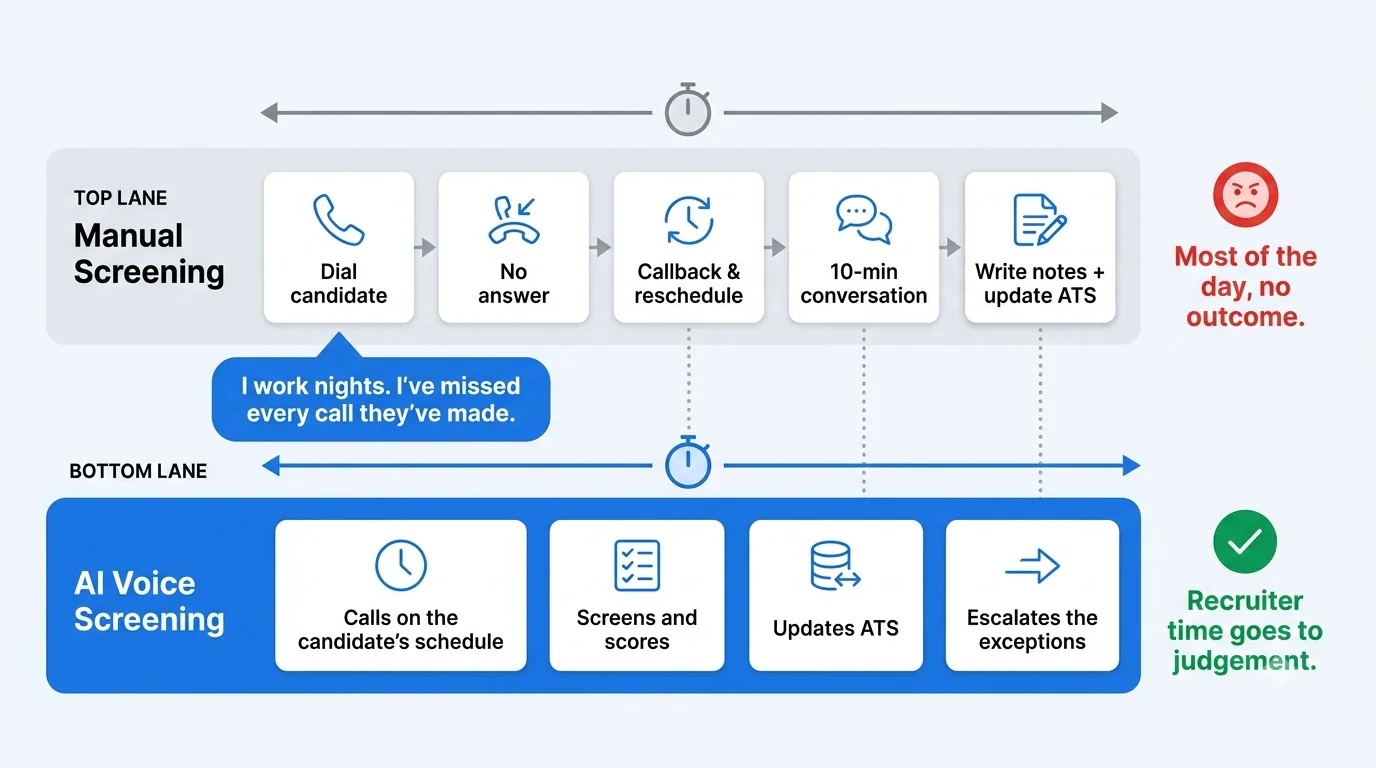
1. Four Hours a Day on Calls That Went Nowhere
A recruiter can spend a large part of the day calling candidates who do not answer.
Then there are callbacks.
Then rescheduling.
Then candidates who answer but are not eligible.
Then the recruiter has to write notes after every call.
The actual conversation may take 10 minutes. The surrounding work can take much longer.
This makes screening a perfect candidate for an AI calling agent.
The AI does not need to replace the recruiter. It can remove the repetitive first layer of conversations.
2. Candidates Who Actually Wanted the Job Stopped Picking Up
Candidate availability is another problem. A recruiter may work from 9 a.m. to 6 p.m. The candidate may work from 6 p.m. to 2 a.m. That creates a simple mismatch.
A candidate can be interested in the job and still miss the screening call. A real-time voice agent can operate outside standard recruiter hours. It can conduct interviews in the evening, at weekends, or at another approved time that works for the candidate.
A real production example shows why this matters:
Elara Caring, a large home healthcare provider, deployed a conversational voice screening agent for high-volume hiring. The company reported that 40% of its interviews were completed during evenings or weekends. It also reported that time from application to offer fell from 6.1 days to 2.7 days, while approximately 400 recruiter hours were saved per month.
These are deployment-specific results, not universal benchmarks. But they demonstrate an important point: availability can become a hiring advantage when screening is no longer restricted to recruiter working hours.
3. Three Recruiters, Three Different Ways of Scoring the Same Answer
Human judgment is valuable; also inconsistent.
Imagine three recruiters asking a candidate about leadership experience.
The candidate says:
“I managed a small team and was responsible for their weekly targets.”
One recruiter may consider that a strong answer. Another may ask how many people were on the team. A third may want evidence of measurable outcomes. All three are making reasonable judgments.
The problem is that the evaluation standard may not be consistent. A properly designed AI voice agent can apply the same evaluation framework to every candidate.
For example:
Leadership score
- 0 — No leadership experience
- 1 — Informal mentoring
- 2 — Small-team supervision
- 3 — Direct people management
- 4 — Multi-team or strategic leadership
The AI can then attach evidence to the score. That creates a structured record instead of relying entirely on recruiter notes. The goal is not to eliminate judgment, but to make the first layer of judgment consistent, explainable, and auditable.
4. The Volume Kept Growing. The Team Didn’t.
Hiring demand does not always increase at the same rate as recruiter headcount. A company can suddenly receive thousands of applications for seasonal roles, new locations, or large hiring campaigns. Adding recruiters may solve the problem temporarily. It also increases operating costs.
A voice agent can handle many simultaneous screening conversations, depending on the underlying telephony and infrastructure capacity.
That makes voice particularly useful for:
- High-volume recruitment
- Seasonal hiring
- Healthcare staffing
- Customer support roles
- Sales roles
- Retail hiring
- Operations roles
- Shift-based positions
For instance, healthcare is a strong use case as staffing teams frequently deal with high application volumes, repetitive screening questions and urgent hiring needs. So in this case, an AI voice agent in healthcare can automate the first conversation with candidates while recruiters step in when human judgment is needed.
The strongest use case is not “AI replaces recruiting.”
It is:
AI absorbs repetitive screening volume so recruiters can focus on higher-value conversations.
How We Thought About It Before We Touched Any Code
The first mistake in a project like this is starting with the model.
The first question should not be:
“Should we use GPT or Claude?”
The first question should be:
“What exactly should the agent do during a live recruitment conversation?”
That distinction shaped the architecture.
1. What “Listen, Think, Decide” Actually Has to Mean Inside a Live Call
We broke the recruiter into three core capabilities.
Listen
The agent receives live audio and turns it into text it can understand.
Think
The agent understands the candidate’s answer, checks it against the job requirements and previous conversation, and decides what to do next.
Decide
The agent chooses an action.
That action could be:
- Ask another question
- Move to the next topic
- Clarify an answer
- Score a competency
- Reject based on a defined knockout criterion
- Schedule an interview
- Escalate to a recruiter
- Update the ATS
- End the call
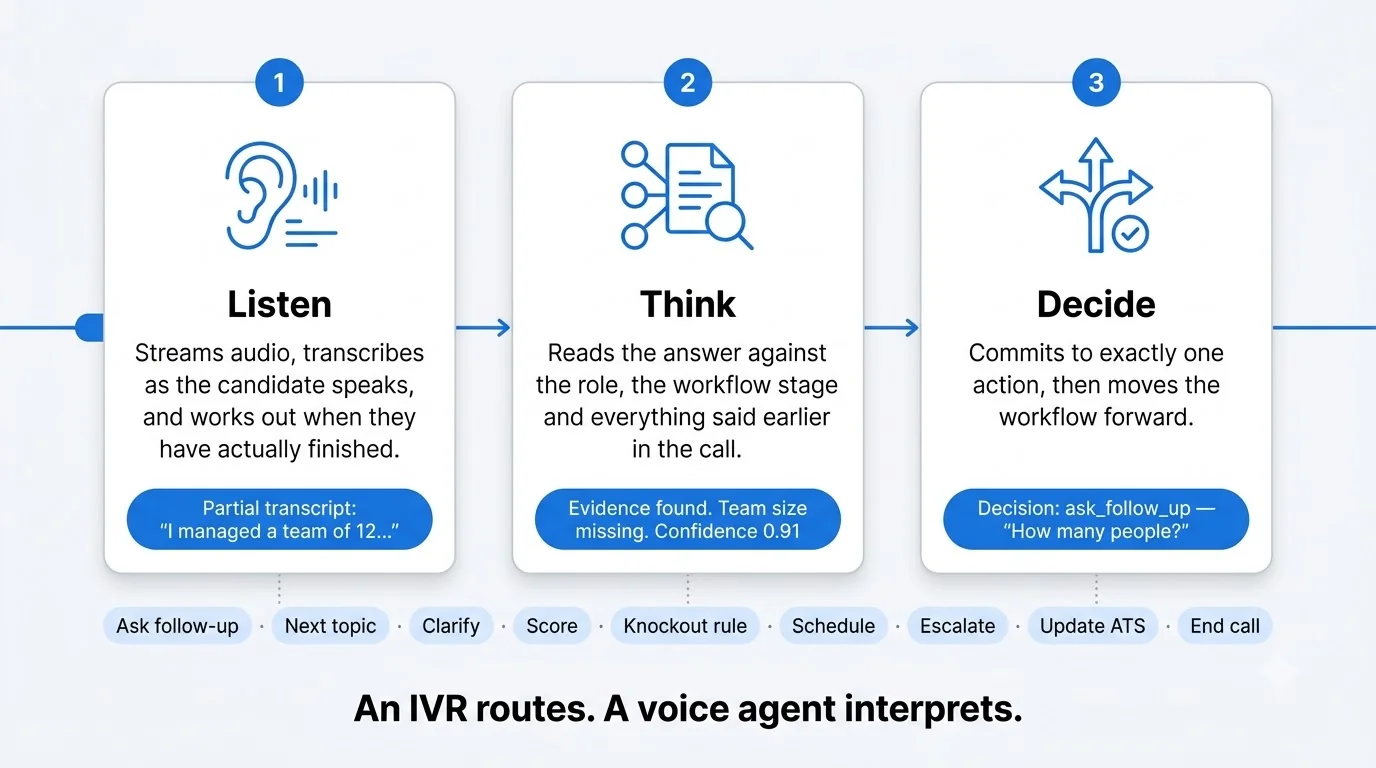
This is what separates a true voice AI agent from a scripted voice bot.
An IVR mainly routes. A conversational voice agent interprets.
2. Why Async Didn’t Work- and Why Real-Time Was the Only Honest Answer
A simple batch workflow might look like this:
- Record the entire call.
- Transcribe it.
- Send the transcript to an LLM.
- Generate a score.
- Decide what happens next.
That works for analysis. It does not work for a live recruiter.
The difference is clearer when compared with traditional AI chatbots. What is an AI Chatbot explains how text-based AI conversations work, while a real-time voice agent takes this a step further. They handle live voice conversations, listen and respond in real time, manage calls, and speak back to users
Suppose the candidate says:
“I actually left my previous company because…”
The agent may need to ask a follow-up immediately. It cannot wait 15 minutes for the entire call to finish. The system therefore needs streaming.
Audio must stream into speech recognition. Transcription must stream into the reasoning layer. The LLM should begin processing useful information as soon as possible. The response should then stream into text-to-speech.
Current voice platforms describe the same basic flow: raw audio enters the system, speech is transcribed, an LLM generates the response, and TTS converts it back into audio.
3. Mapping a Recruiter’s Brain Into Something a State Machine Could Follow
A recruiter does not approach every candidate with one giant instruction. There is usually a workflow.
For example:
Opening → Eligibility → Experience → Skills → Availability → Compensation → Candidate Questions → Decision
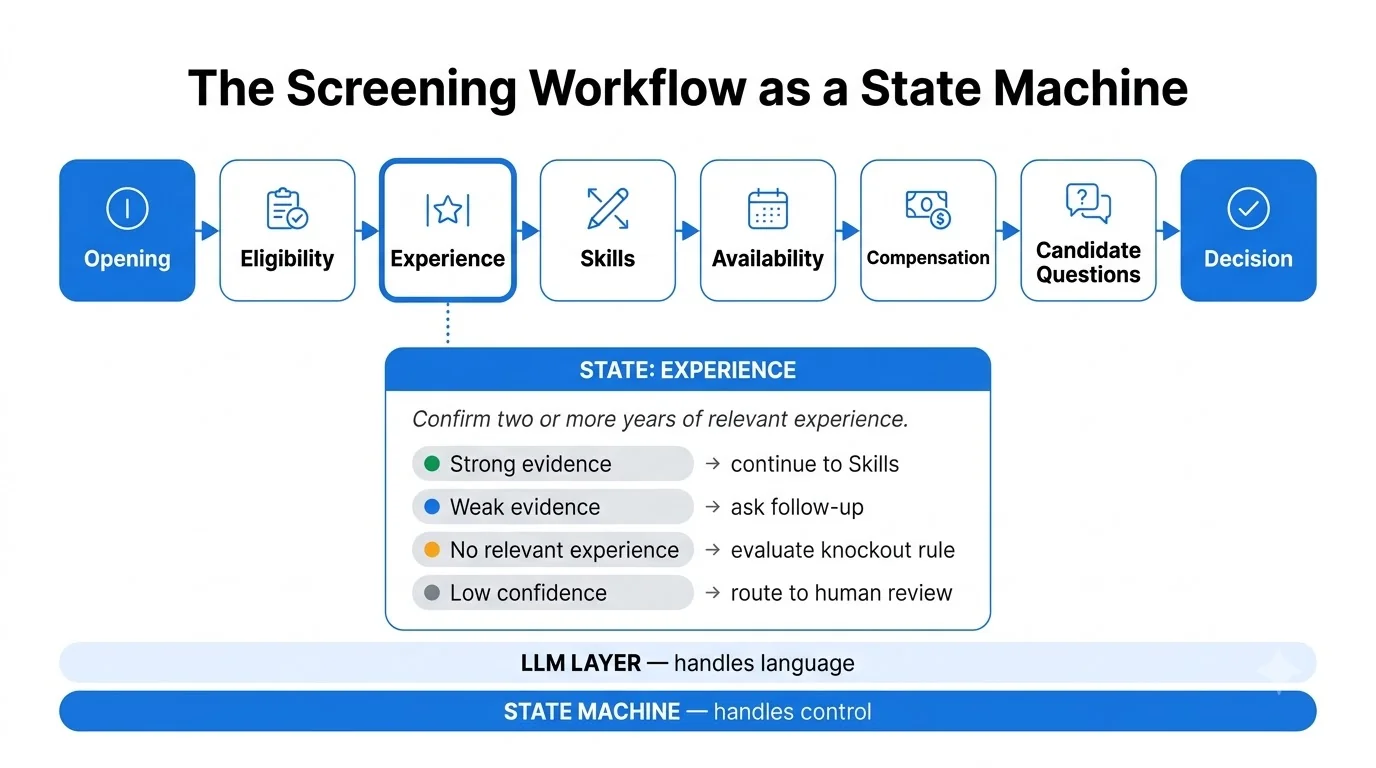
We modeled the agent in a similar way.
Each state has:
- Required information
- Optional information
- Questions
- Exit conditions
- Failure conditions
- Escalation rules
So we modeled the agent the same way.
A simple state might look like:
STATE: EXPERIENCE
Goal: determine whether the candidate has at least two years of relevant experience.
Possible outcomes:
- Strong evidence → continue
- Weak evidence → ask follow-up
- No relevant experience → evaluate knockout rule
- Unclear → ask clarification
- Low confidence → human review
This state-machine layer sits around the LLM.
The LLM handles language.
The state machine handles control.
That distinction matters.
4. The Three Loops That Had to Run at the Same Time Without Falling Over
A production voice agent effectively has three concurrent loops.
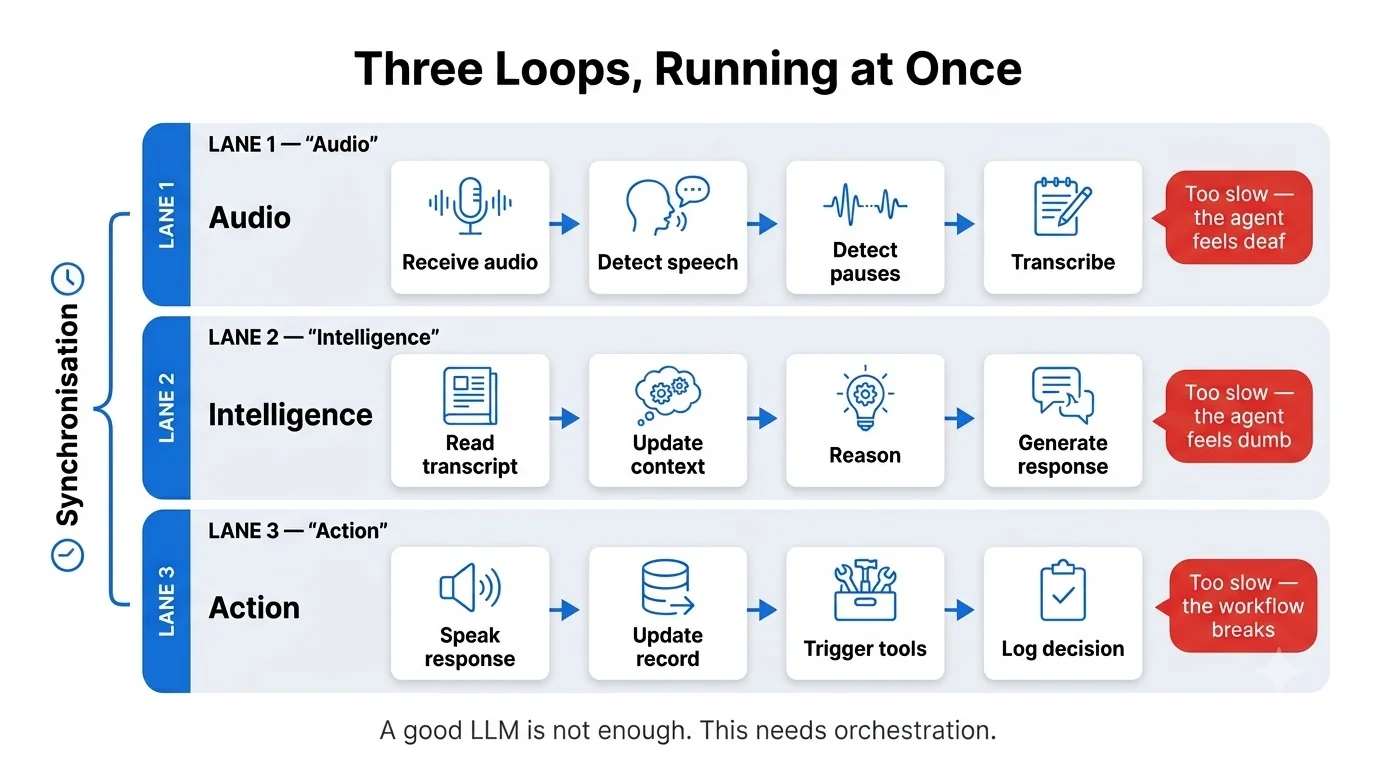
Loop 1: Audio
Receive audio → detect speech → detect pauses → transcribe.
Loop 2: Intelligence
Read transcript → update context → reason → decide → generate response.
Loop 3: Action
Speak response → update candidate record → trigger tools → log decisions.
The hard part is synchronization.
If Loop 1 is too slow, the agent feels deaf.
If Loop 2 is too slow, it feels dumb.
If Loop 3 is slow, the conversation may be fine but the business workflow breaks.
A good AI voice agent platform therefore needs more than a good LLM. It needs strong orchestration.
The Stack We Chose- And the Reasoning We’d Stand Behind
A practical production architecture looks like:
Phone → Telephony → Streaming Audio → STT → LLM → Tool/Decision Layer → TTS → Phone
And alongside the live pipeline sits another layer:
Conversation State → ATS → Scheduling → Analytics → Logs → Evaluation
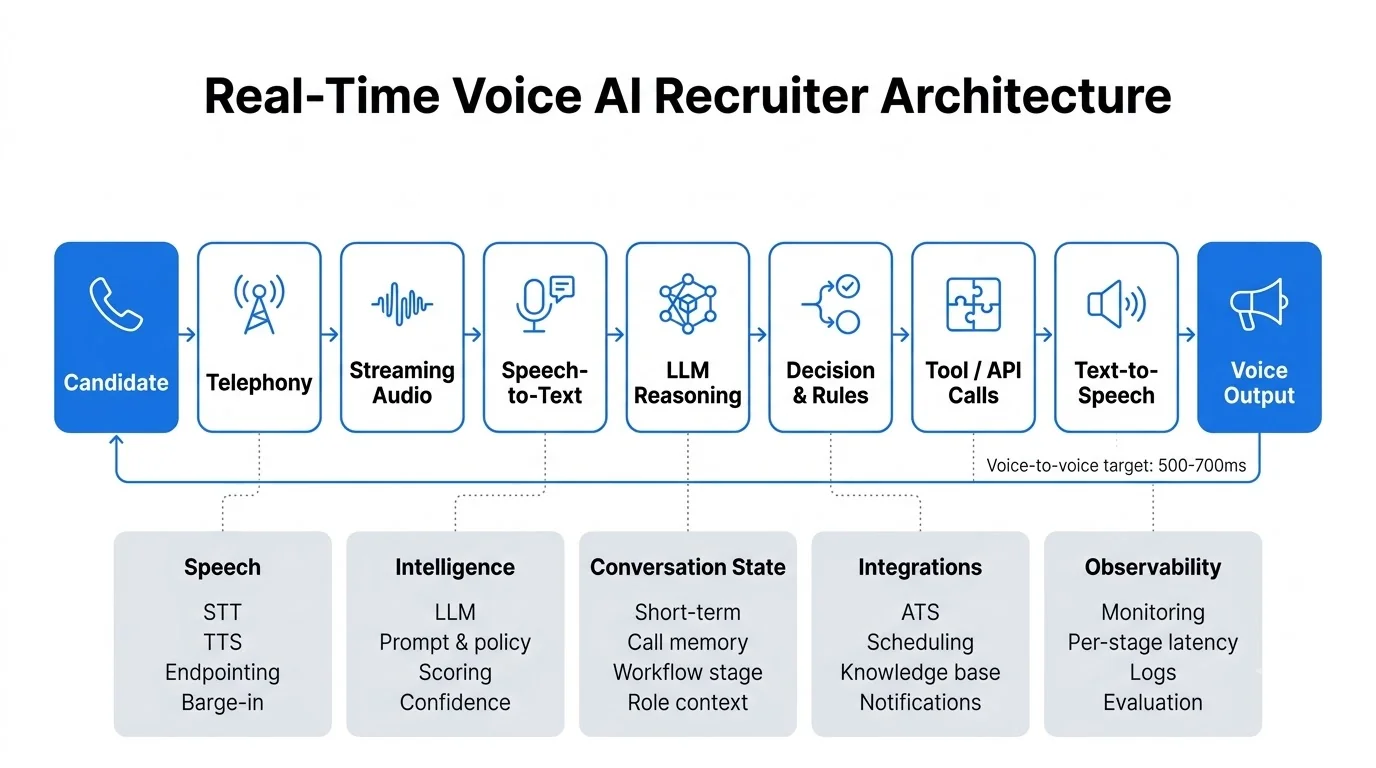
Each component has a different responsibility.
Building this kind of system requires more than connecting an LLM to a phone. The telephony layer, speech recognition, reasoning, workflow state, business rules, tools, and integrations all need to work together reliably. This is where AI Agent Development Services can help organizations design and build production-ready agents around their specific workflows.
1. Speech-to-Text: Why Deepgram Beat Whisper for Calls That Are Actually Live
Whisper is a strong speech recognition model.
But live phone conversations have different requirements from uploaded audio.
For a real-time recruiter, we care about:
- Streaming
- End-of-turn detection
- Partial transcripts
- Low latency
- Phone-quality audio
- Background noise
- Accents
- Interruptions
Deepgram’s documentation states that its streaming models are optimized for transcription latency of 300 milliseconds or less and recommends audio buffers in the 20–100ms range for streaming workloads.
That does not mean every production call will achieve 300ms.
Network distance, infrastructure, buffering, audio processing, and system load all affect the final latency.
The important point is that streaming STT lets us start working with the candidate’s speech before the entire conversation turn is complete.
That is important for a live voice AI agent.
2. The LLM Decision Layer: GPT-4o vs Claude in a Conversation That Can’t Pause
The LLM is responsible for language understanding and reasoning. But we did not want it to control the entire system.
The model receives structured context such as:
- Candidate profile
- Job description
- Current workflow state
- Previous answers
- Evaluation criteria
- Allowed tools
- Safety rules
Then it produces a structured action.
For example:
Decision: ask_follow_up
Competency: leadership
Confidence: 0.91
Reason: candidate mentioned managing a team but did not provide team size
Next question: How many people were on the team you managed?
This is safer than asking the model to give a free-form answer and then trying to understand it in the application code.
Model selection should also be based on testing. GPT-4o may perform well for multimodal and real-time interactions. Claude may perform well for particular reasoning and context-heavy tasks. Other models may perform better on cost or latency.
The correct approach is to benchmark them against the actual recruitment workflow.
We would measure:
- Follow-up quality
- Instruction following
- Structured output accuracy
- Hallucination rate
- Latency
- Cost per conversation
- Consistency
- Long-context performance
The best model is the one that performs best inside your workflow, not the one with the loudest benchmark.
3. Voice Output: What It Actually Takes to Stop Sounding Like a Robot
A technically correct answer can still sound unnatural. This often happens when the system is designed for written language instead of spoken language.
Consider:
“Thank you for providing that information. Could you please elaborate on your previous experience managing cross-functional teams?”
It is grammatically correct. It is also longer than necessary for a phone conversation.
Hence, a better version would be:
“Got it. Tell me about a team you managed.”
Voice responses should generally be:
- Short
- Clear
- Easy to understand
- Naturally paced
- Interruptible
- Appropriate for the context
The agent should also avoid speaking when the candidate is still talking. That requires coordination between speech detection, endpointing, and TTS.
4. Telephony: How Twilio and Vapi Handle the Parts Nobody Thinks About
Once the voice AI agent can understand and respond to a candidate, there is still another engineering layer that has to make the conversation happen: telephony.
The phone call itself requires a lot of technology. A voice system needs to manage phone numbers, make calls, stream audio, handle call inputs, record conversations, track call events, route calls, and recover when something goes wrong.
This is where platforms such as Twilio and Vapi become important.
Twilio works closer to the phone system. Twilio Media Streams sends live call audio to an application through a WebSocket. With two-way streaming, the application can also send audio back to the call, allowing real-time AI conversations.
Twilio supports this through its <Connect><Stream> configuration for bidirectional media streams, while <Start><Stream> creates a unidirectional stream. This gives engineering teams considerable control over how audio flows between the phone call and the AI system.
But that flexibility also means more infrastructure to design, integrate, monitor, and maintain.
Vapi operates at a higher level of abstraction. Rather than requiring the engineering team to build every part of the voice pipeline independently, Vapi provides an orchestration layer that connects transcription, LLM processing, and voice generation while handling much of the streaming and latency coordination required for real-time conversations.
The distinction is therefore less about which platform is “better” and more about where you want to draw the abstraction boundary.
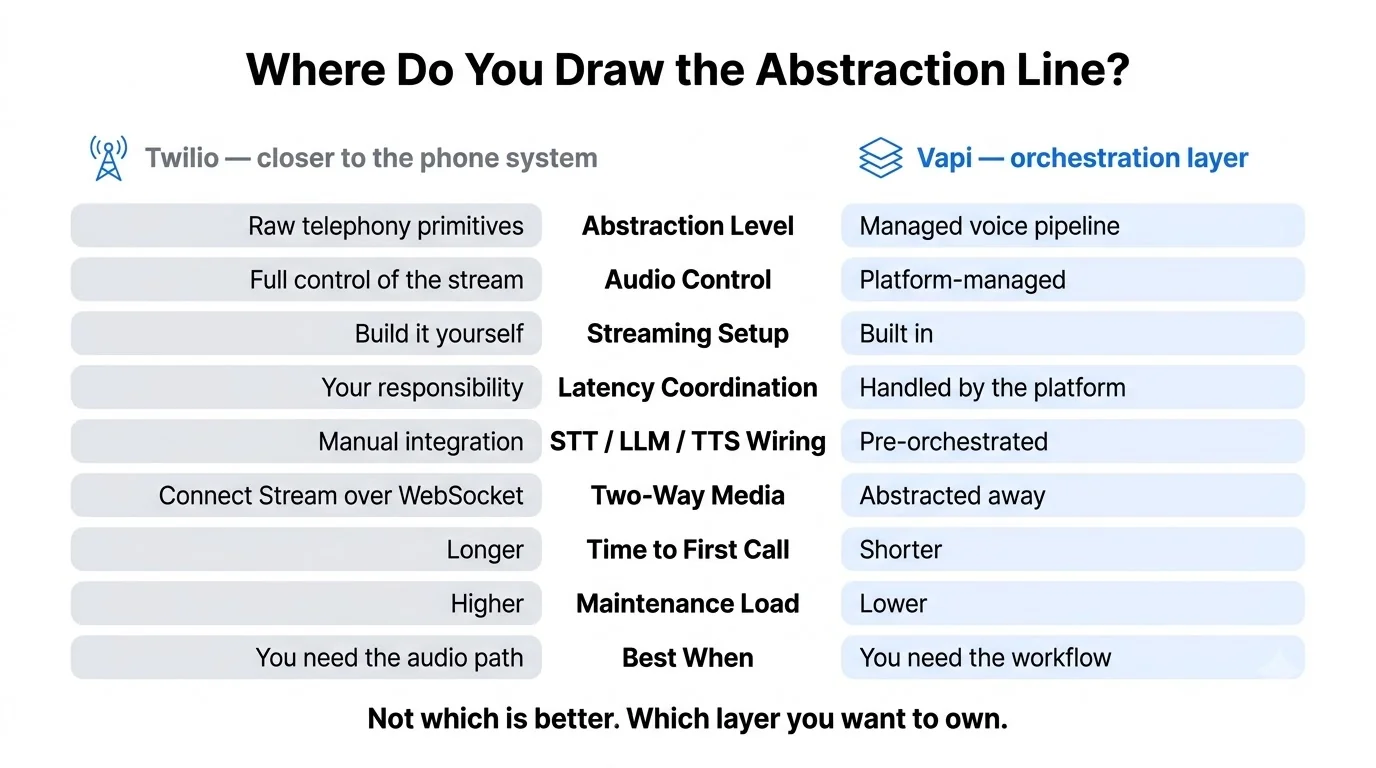
A custom Twilio-based architecture gives an engineering team greater control over the telephony and audio pipeline, but it also comes with greater implementation and maintenance responsibility.
A platform such as Vapi can significantly reduce the amount of voice infrastructure that needs to be built from scratch. This allows the team to focus more on the recruiting workflow and conversational logic.
As voice AI moves from prototypes to high-volume workflows, reliability, security, scalability, integrations, and failure recovery become as important as conversation quality. This is where Enterprise AI Voice comes in: building voice systems that can operate reliably within existing enterprise infrastructure and at scale.
In production, the goal is not just to make calls, it is to reliably place, manage, and recover thousands of conversations without infrastructure becoming the bottleneck.
5. Keeping Everything Synced Under 500ms- The Piece That Nearly Broke the Build
Latency is not one number; it is a chain:
Network + Endpointing + STT + LLM + TTS
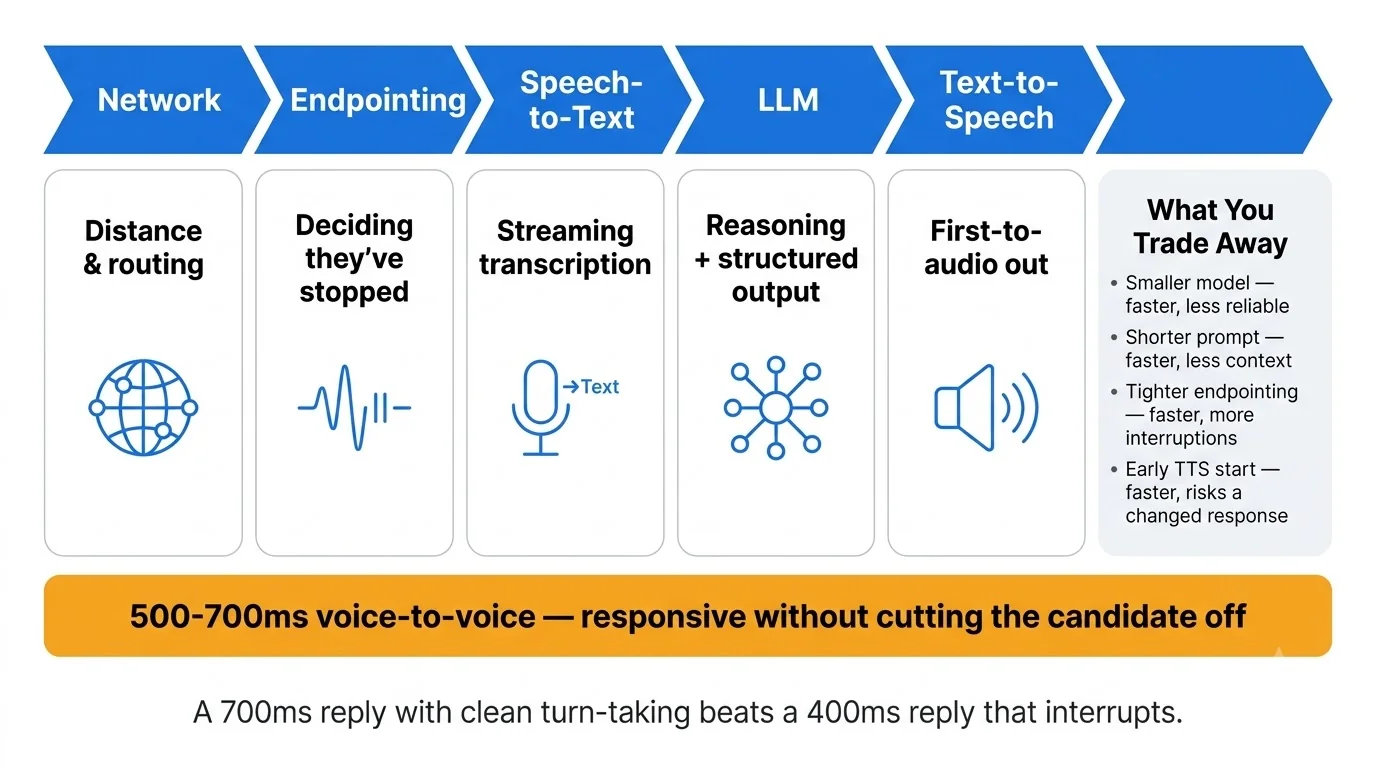
Vapi describes voice-to-voice latency as the time between the end of the user’s speech and the first audio from the AI. Its documentation suggests that a voice interaction should ideally stay below one second, with 500–700ms being a useful target for highly responsive conversations.
That does not mean every response needs to be exactly 500ms.
A 700ms response with natural turn-taking can feel better than a 400ms response that interrupts the candidate.
The optimization strategy is therefore not simply:
Make everything faster.
It is:
Make the entire interaction feel responsive without reducing accuracy.
How the Agent Listens- What’s Actually Happening While the Candidate Talks
When a candidate speaks, several things happen simultaneously.
The audio is captured and streamed in real time while speech recognition starts generating transcript data. The system also monitors pauses and updates the conversation state.
The key challenge is knowing when the candidate has actually finished speaking. A pause could mean they are done or simply thinking.
The agent therefore evaluates the audio, transcript, and timing to determine when it is safe to respond. Only then does it move on to generating the next response.
1. We Got Streaming vs Full-Sentence Wrong First. Here’s What We Missed.
A basic implementation might work like this:
Candidate speaks → sentence ends → transcript → LLM → response
The problem is the waiting time.
A streaming architecture works differently:
Candidate speaks → partial transcript → context update → endpoint detection → reasoning → response
The transcript can evolve.
For example:
“I managed…”
then:
“I managed a team…”
then:
“I managed a team of 12…”
The system does not have to treat every partial transcript as a final answer. It can use partial information to prepare the next step.
That reduces the amount of dead time between turns.
2. Teaching It the Difference Between a Pause and an Interruption
People do not speak like text. They pause; they restart sentences.
A candidate might say:
“Yes, I worked with…”
pause for 700ms…
“Sorry, I mean I worked with three different teams.”
If the agent jumps in after the first pause, the conversation feels broken.
Modern voice systems use endpointing and voice-activity detection to estimate when a speaker has actually finished. Vapi’s speech configuration includes separate controls for when an assistant starts speaking and when it stops if the caller starts talking.
We also need a barge-in rule:
If the candidate starts talking while the AI is speaking, stop the AI.
No talking over the candidate.
No awkward:
“Thank you for…”
“Sorry, can I just…”
“Thank you for your…”
That is exactly the kind of thing that makes an AI caller sound like a robot.
3. Accents, Background Noise, Kids Screaming in the Background- The 3% We Still Get Wrong
Real calls are messy.
Candidates speak with different accents.
Some use cheap earphones.
Some are in traffic.
Some are working from home with a dog barking in the background.
Some are speaking English as a second language.
This is why a voice AI agent cannot be evaluated only in a quiet office.
Testing needs a real-world audio set:
- Different accents
- Fast speech
- Slow speech
- Background conversations
- Music
- Phone compression
- Network degradation
- Short answers
- Long answers
- People speaking over the AI
Average transcription accuracy is not enough.
A system can perform well overall and still fail badly for a particular accent or environment.
4. What Happens When the Candidate Goes Somewhere We Didn’t Plan For
This happens constantly.
Let’s say the agent asks:
“Are you comfortable working night shifts?”
The candidate says:
“Actually, I have a question. Is transportation provided?”
The agent has two choices.
Ignore it and continue the script.
Or answer the question.
A good agent does the second.
This is where retrieval and tool calling become important.
If transportation information exists in the approved knowledge base, the agent can retrieve it.
If it does not, the agent should say it does not have that information and route the question to a human.
Never make something up just to keep the conversation flowing.
How the Agent Thinks- LLM Reasoning Happening Inside an Active Phone Call
The candidate’s answer is not just text.
It is evidence.
The LLM needs to determine what that evidence means for the hiring workflow.
1. The System Prompt That Took Three Weeks and Still Needed Another Two
The system prompt is not simply a paragraph saying:
“You are a friendly recruiter.”
It is closer to an operating manual.
It defines:
- Role
- Tone
- Allowed topics
- Forbidden topics
- Job requirements
- Knockout criteria
- Scoring rules
- Clarification rules
- Escalation rules
- Tool permissions
- Privacy rules
- Output format
And it needs examples.
Bad example:
“Be conversational.”
Better:
“Ask one question at a time. Use short sentences. Do not repeat information already provided by the candidate. If the candidate pauses, wait before responding.”
The difference is huge.
2. Generating the Follow-Up Question From What Was Just Said
This is where the agent becomes genuinely conversational.
Suppose the job requires leadership experience.
Candidate says:
“I managed a small team.”
The agent should not automatically move on.
It can ask:
“How many people were on that team?”
Candidate:
“Eight.”
Now the system has stronger evidence.
Then:
“What were you responsible for?”
That is a follow-up chain. It is not a fixed script.
The next question is based on the information gap.
That is different from a fixed interview script where every candidate receives the same sequence regardless of their answers.
3. Scoring in Real Time- What Counts as a Strong Answer vs a Weak One
We avoided a simple:
Good = 1
Bad = 0
Instead, each competency can have a score and evidence.
For example:
Leadership
- 0 = No leadership experience
- 1 = Informal mentoring
- 2 = Small-team management
- 3 = Direct people management with measurable ownership
- 4 = Large-team or multi-team leadership
The AI should return the score with evidence.
Example:
Score: 3
Evidence: Candidate managed eight direct reports and owned weekly performance reviews.
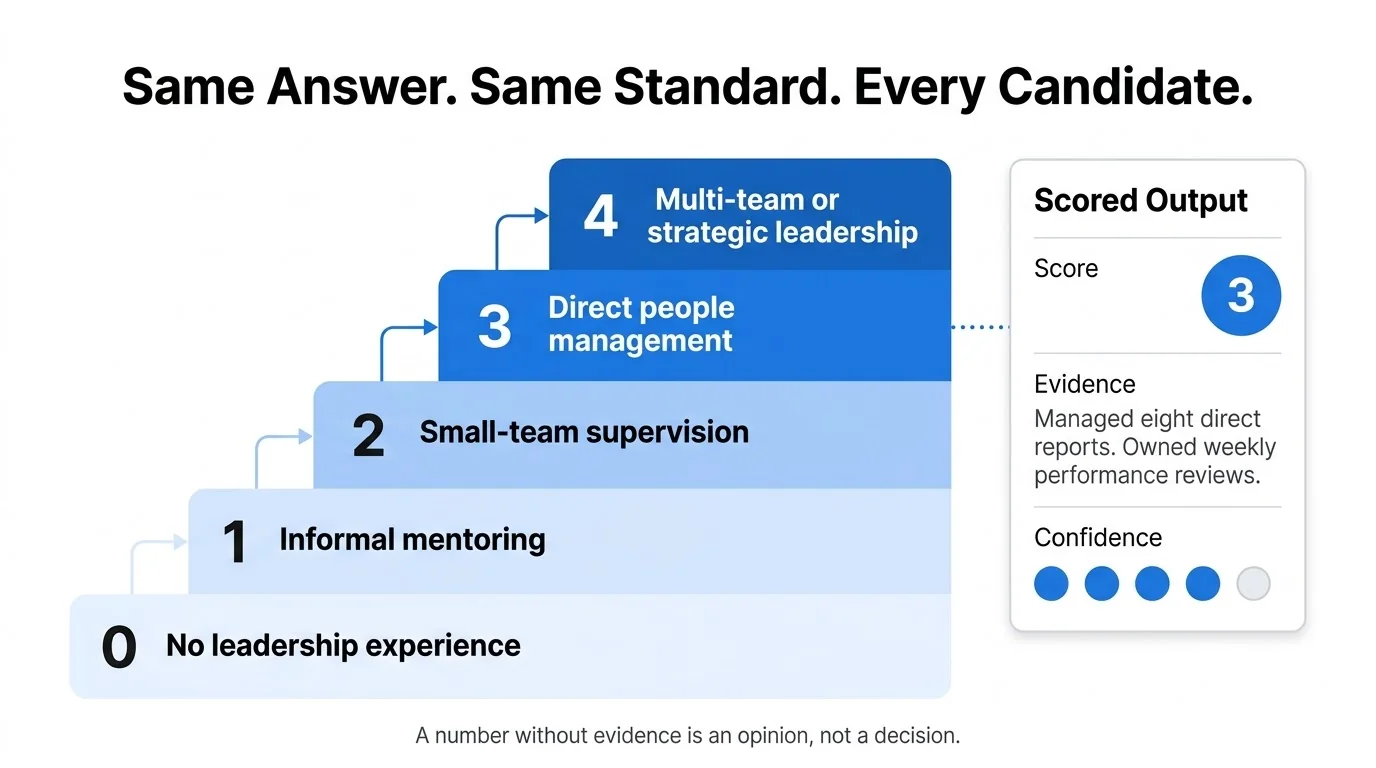
This makes the decision easier to audit. It gives recruiters a reason for the score rather than only a number.
4. When the Answer Is Vague and the Agent Can’t Just Move On
Not every candidate’s response provides enough information to evaluate an answer confidently.
When a response is too vague, the agent should follow a defined clarification rule rather than immediately moving to the next question.
For example:
Candidate: “Yes, I have worked with that technology.”
Agent: “Could you tell me how you used it in your previous role?”
If the candidate remains vague, the agent should make only a defined number of clarification attempts. After that, the result should be treated as low confidence and routed for human review or a neutral outcome.
This prevents the LLM from forcing a decision when the available evidence is insufficient.
5. Every Millisecond We Cut From Latency and What It Cost Us to Get There
Latency optimization creates trade-offs. A smaller model may be faster but less reliable. A shorter prompt may reduce processing time but remove useful context.
Shorter endpointing may improve speed but increase interruptions. Starting TTS earlier may improve responsiveness but create problems if the generated response changes. Every optimization therefore needs to be measured against conversation quality.
The target is not the lowest possible latency, it is the best balance between:
Speed + accuracy + natural turn-taking.
So optimization is not:
“Make everything faster.”
It is:
“Make the conversation feel faster without making the decisions worse.”
How the Agent Decides- Twelve Minutes of Conversation Into a Hiring Call
The final output of the screening should be structured.
“Candidate seems good” is not enough.
The system needs to convert a conversation into useful recruiting data.
1. The Shortlist Threshold- What Actually Triggers a Reject
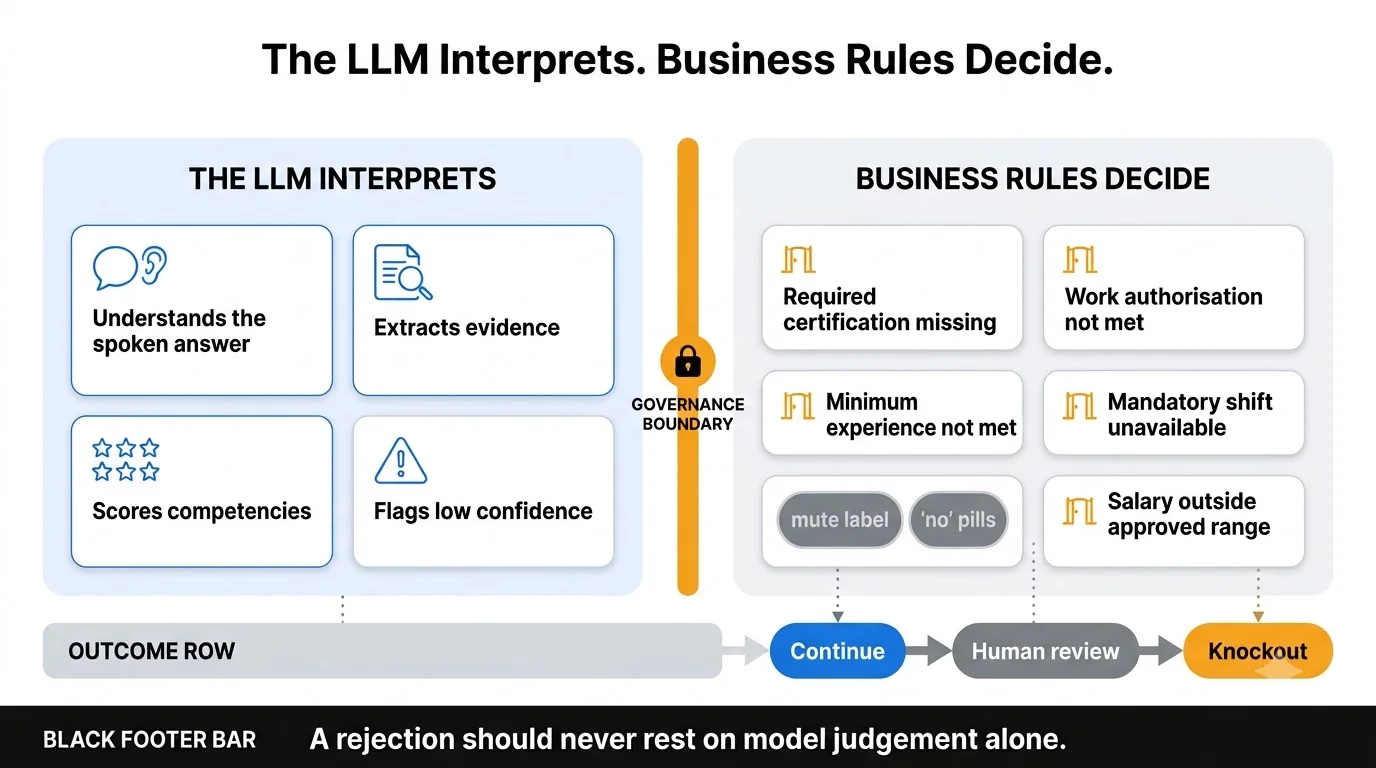
A rejection should never depend on the LLM’s judgment alone. Eligibility needs to be defined by explicit, pre-approved criteria.
For example:
- Required certification missing
- Work authorization requirement not met
- Minimum experience not met
- Mandatory shift unavailable
- Salary expectations outside approved range
These are objective business rules, not decisions the model should invent or interpret differently.
The principle is simple:
The LLM interprets the candidate’s answers. Business rules determine eligibility.
2. When It Hands Off to a Human and Why That Line Has to Be Sharp
Human escalation should not be treated as failure.
It is a feature.
Escalate when:
- Confidence is low
- Candidate disputes a decision
- Candidate asks a sensitive question
- Candidate raises a complaint
- The system detects a policy issue
- The candidate requests a human
- The conversation enters an unsupported scenario
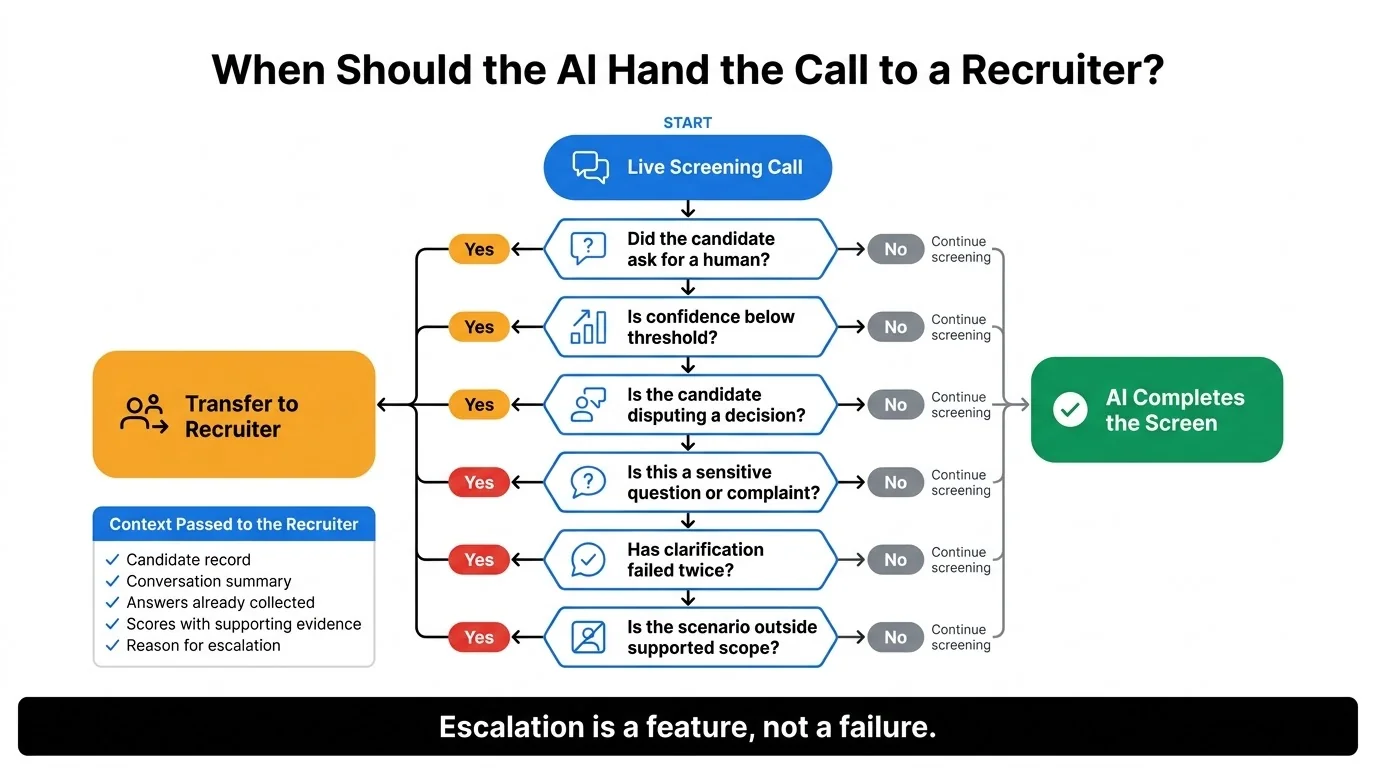
This is more important in recruitment because hiring decisions can have a big impact.
A voice system should have human support, clear records, access controls, and proper handling of candidate data.
The reference architecture also emphasizes governance, privacy, human escalation, and audit trails as core components of enterprise voice AI.
3. The Interview Summary Nobody Had to Write
After the call, the system can generate a structured summary.
For example:
- Candidate: Jane Doe
- Experience: 4 years
- Relevant skills: Python, AWS, SQL
- Leadership: Managed 6 engineers
- Availability: Two weeks
- Compensation: Within approved range
- Strengths: Strong technical experience and direct team-management experience
- Concerns: Limited experience with the required healthcare domain
- Recommendation: Move to technical interview
- Confidence: High
The recruiter gets the useful information without having to listen to the entire call again.
4. Pushing the Output Into the ATS Without Anyone Touching It
The final step is connecting the agent to the systems that recruiters already use.
The voice agent can send structured information to an ATS through an API.
For example:
candidate_id
screening_status
experience_score
skills_score
availability
salary_expectation
recommendation
confidence
summary
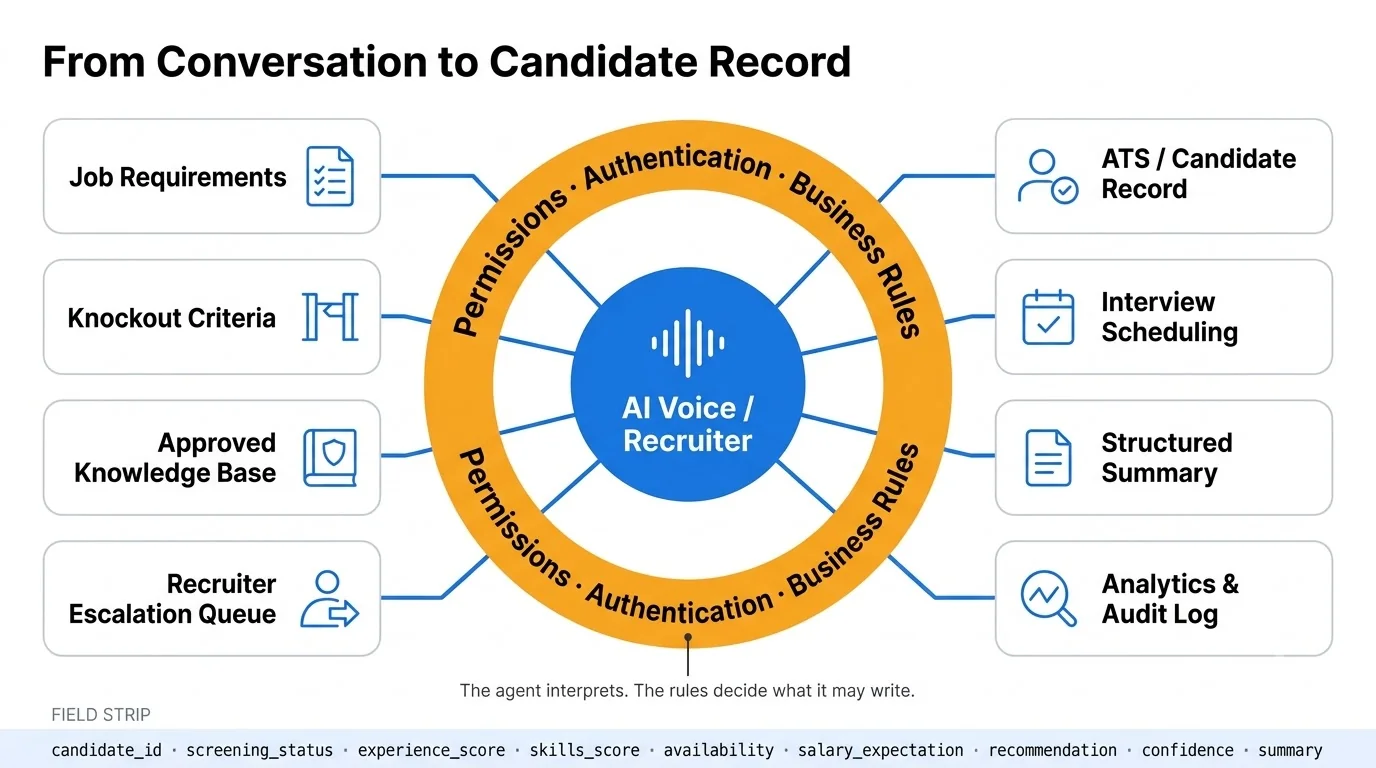
The orchestration layer then updates the candidate record.
Modern voice agent architectures commonly connect to systems of record such as ATS, CRM, HRIS, scheduling systems, and other APIs.
The call is only one part of the automation. The real value comes from what happens after the call.
The Parts That Were Genuinely Hard and Took Longer Than They Should Have
Building a voice screening agent is not just about getting an LLM to ask questions and generate answers. The difficult part was making the system behave reliably throughout an entire conversation.
1. Holding Conversation State Across a 15-Minute Call Without Losing Thread
A 15-minute screening call creates more context than the agent can or should treat as one continuous prompt.
The agent needs to keep track of what was just said, what the candidate mentioned earlier, where they are in the screening workflow, and what the role actually requires.
We separated this into four layers:
- Short-term memory- What was just said?
- Conversation memory- What did the candidate say earlier in the call?
- Workflow state- Which stage of the screening process are we in?
- Business context- What does this particular role require?
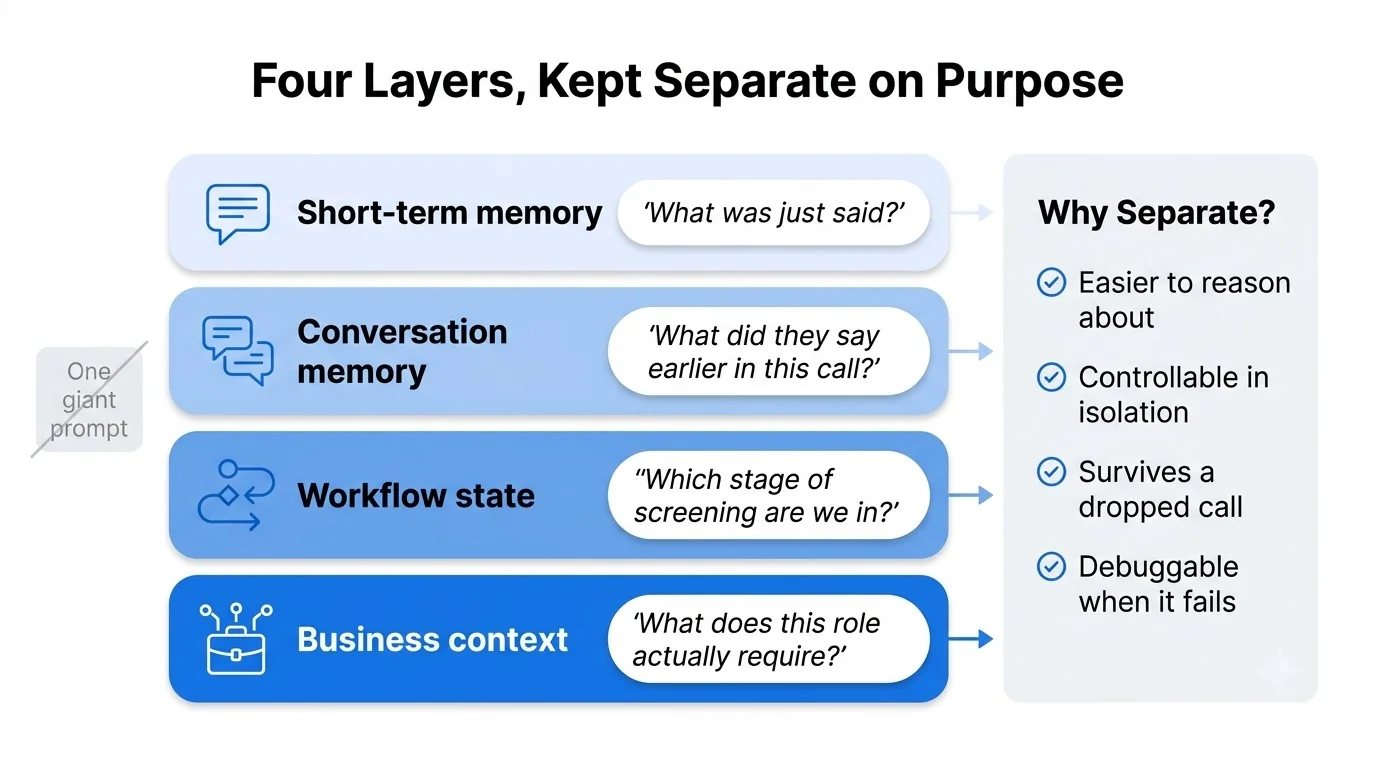
Instead of putting all of this into one massive prompt, we kept these layers separate.
That made the system easier to reason about, control, and most importantly- debug when something went wrong.
2. Stopping the Agent From Filling Gaps With Things It Made Up
Hallucination is a serious problem in recruitment.
Suppose a candidate asks:
“Does the company provide relocation assistance?”
If the agent does not have approved information, it should not invent an answer.
It should say:
“I don’t have that information available. I can have a recruiter confirm it.”
The system should therefore distinguish between:
Known information: Information available from approved sources.
Unknown information: Information the system does not have.
Restricted information: Information the agent should not provide or decide.
That distinction is critical for reliable conversational AI voice agents.
3. The Voice Was Still Robotic at Week Three- Here’s the Fix That Actually Worked
At first, we assumed the problem was the voice model. It wasn’t.
Even with a good TTS model, the agent still sounded robotic because the conversation itself was written like a script. The fix was to redesign how the agent spoke.
We shortened long responses, made questions more direct, removed unnecessary repetition, and introduced brief acknowledgements.
For example:
Instead of:
Thank you for sharing that. Would you be comfortable working in a role that requires weekend availability?
Use:
“Thanks. Are you available to work weekends?”
The second version is shorter, easier to process, and sounds much more natural when spoken.
Voice quality is therefore not just a TTS problem. It is also a conversation-design problem.
4. Calls That Drop Mid-Sentence and the Recovery Logic We Had to Build Twice
A voice interview cannot assume that a phone call will stay connected from start to finish. Calls drop, networks fail, and interruptions happen even in the middle of an answer.
The challenge is making sure a dropped call does not mean losing the interview state.
The system needs to persist enough information to recover:
- Which candidate was being screened
- Which stage of the interview was active
- Which question was last completed
- What answer was last recorded
- Whether a decision had already been made
When the candidate reconnects, the agent should pick up from the appropriate point, not restart the entire interview.
That requires reliable state persistence outside the live call connection, so the conversation can survive the failure of the call itself.
5. Latency That Only Broke Under Real Load- Not Once in Testing
Five calls are easy.
Five hundred simultaneous calls are different.
Under production load, you may see:
- WebSocket delays
- Queue buildup
- API throttling
- LLM latency spikes
- TTS delays
- Database contention
- Telephony failures
That is why load testing needs to happen before launch.
And latency should be monitored per component, not only as one average number.
Vapi’s current performance framework, for example, separately tracks transcriber, model, voice, endpointing, and turn latency from production calls.
What the Numbers Said After We Deployed It
This is where we would draw a hard line between measured product data and industry benchmarks.
If a production deployment does not have verified metrics, we should not manufacture them for a case study.
Instead, we measure four things.
1. How Much Time It Actually Saved Per Recruiter Per Week
The most useful productivity metric is not the number of calls the AI completed.
It is the amount of recruiter time returned to the team.
Track:
Before
- Screening hours
- Scheduling hours
- Follow-up time
- Note-taking time
- ATS updates
After
- Human escalations
- Final interviews
- Exception handling
- Candidate conversations requiring judgment
The goal is not to eliminate recruiter involvement. It is to move recruiters away from repetitive screening work and toward the parts of hiring where human judgment matters most.
The actual impact will vary based on hiring volume, screening length, and how the workflow is designed.
2. Candidate Completion Rate vs Old-School Phone Screening
Completion rate is another important metric.
If candidates receive an invitation but never complete the screen, automation has not solved the entire problem.
In a separate healthcare deployment, Phenom reported an 85% completion rate across nearly 1,800 graduate nurse screening invitations.
The key metrics to monitor are:
- Invitation-to-screen rate
- Screen completion rate
- Time to completed screen
- Candidate drop-off rate
- Reschedule rate
These metrics show whether the system is actually improving the candidate experience.
3. How Often the AI Shortlisting Matched What a Human Recruiter Would Have Done
Agreement with human recruiters is useful. But it should not be the only metric.
Suppose the AI agrees with recruiters 95% of the time.
That sounds good.
But what if most disagreements are strong candidates incorrectly rejected by the AI? That would be a serious problem.
We therefore need to track:
- Human-AI agreement
- False positives
- False negatives
- Confidence
- Evidence quality
- Escalation rate
A blind evaluation works well.
Recruiters score a sample without seeing the AI recommendation. The AI scores the same candidates.
The results are then compared.
4. The Roles It Worked Well For- and the Ones It Didn’t Handle Well
Voice screening works particularly well when the initial qualification process is structured.
Strong use cases include:
- Customer support
- Sales development
- Retail
- Healthcare staffing
- Operations
- High-volume hiring
- Shift-based roles
It is less appropriate as a fully autonomous decision-maker when the role requires complex judgment or highly nuanced evaluation.
The sweet spot is:
High volume + repeatable questions + clear criteria.
What We’d Do Differently If We Started This Tomorrow
The technology is only one part of the project.
How you approach the problem plays a big role in how quickly the technology becomes reliable.
Looking back, we learned some important lessons from our early mistakes: we tried to solve too much at once, started evaluating too late, and didn’t get enough input from the people who would actually use the system.
If we were starting again, we would do things differently from the beginning. These are the three changes that would make the biggest difference.
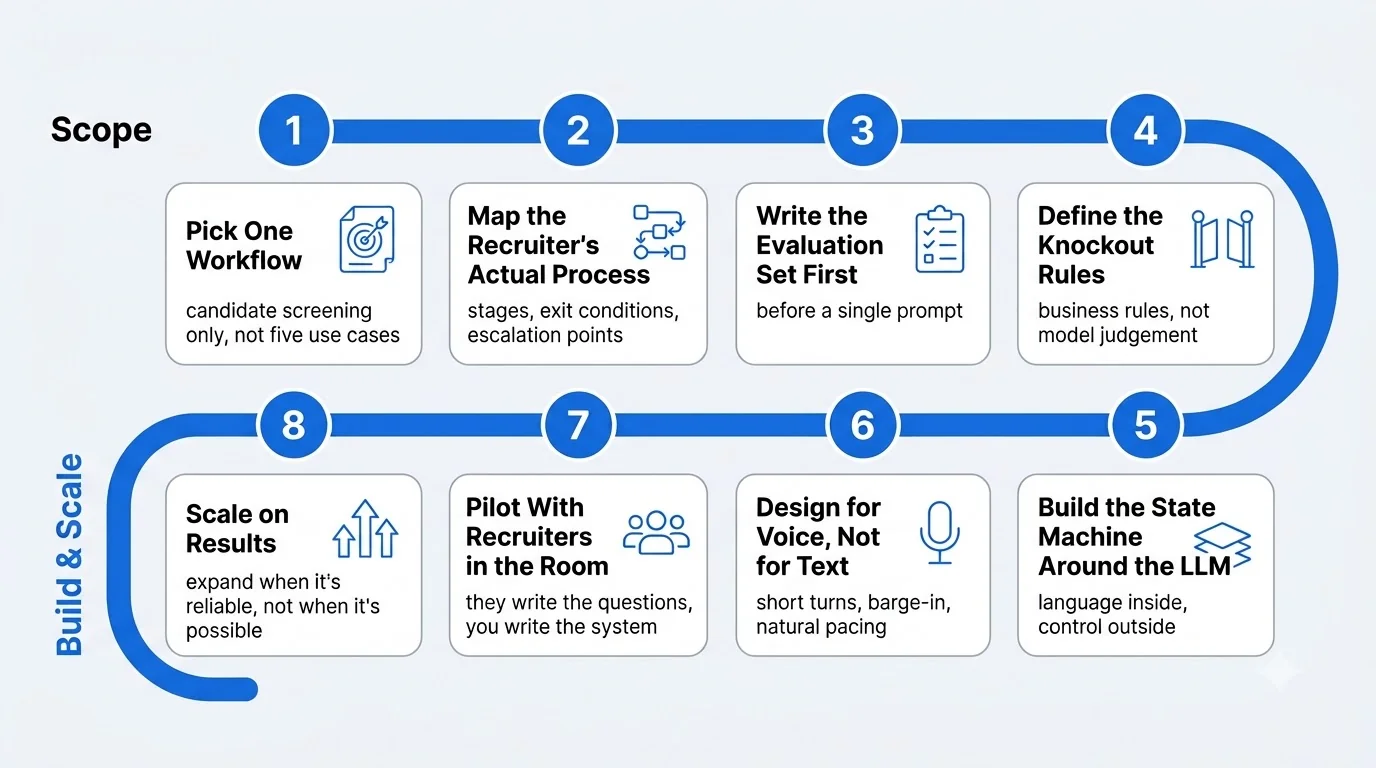
1. One Use Case, Not Five. We Learned That the Hard Way.
It is tempting to build one platform that handles recruiting, customer service, sales, appointment booking, and support.
That creates unnecessary complexity.
A better approach is to start with one workflow.
For this use case:
Candidate screening
- Define the workflow.
- Build it.
- Measure it.
- Improve it.
- Then expand.
The same idea applies beyond recruitment. Start with a small, focused, high-volume process. Set clear success measures before launching, test it with a small pilot, and expand only when the system works reliably.
For organizations that don’t have the right expertise in-house, working with an AI voice agent agency can also help. It can turn a focused business workflow into a production-ready voice AI solution.
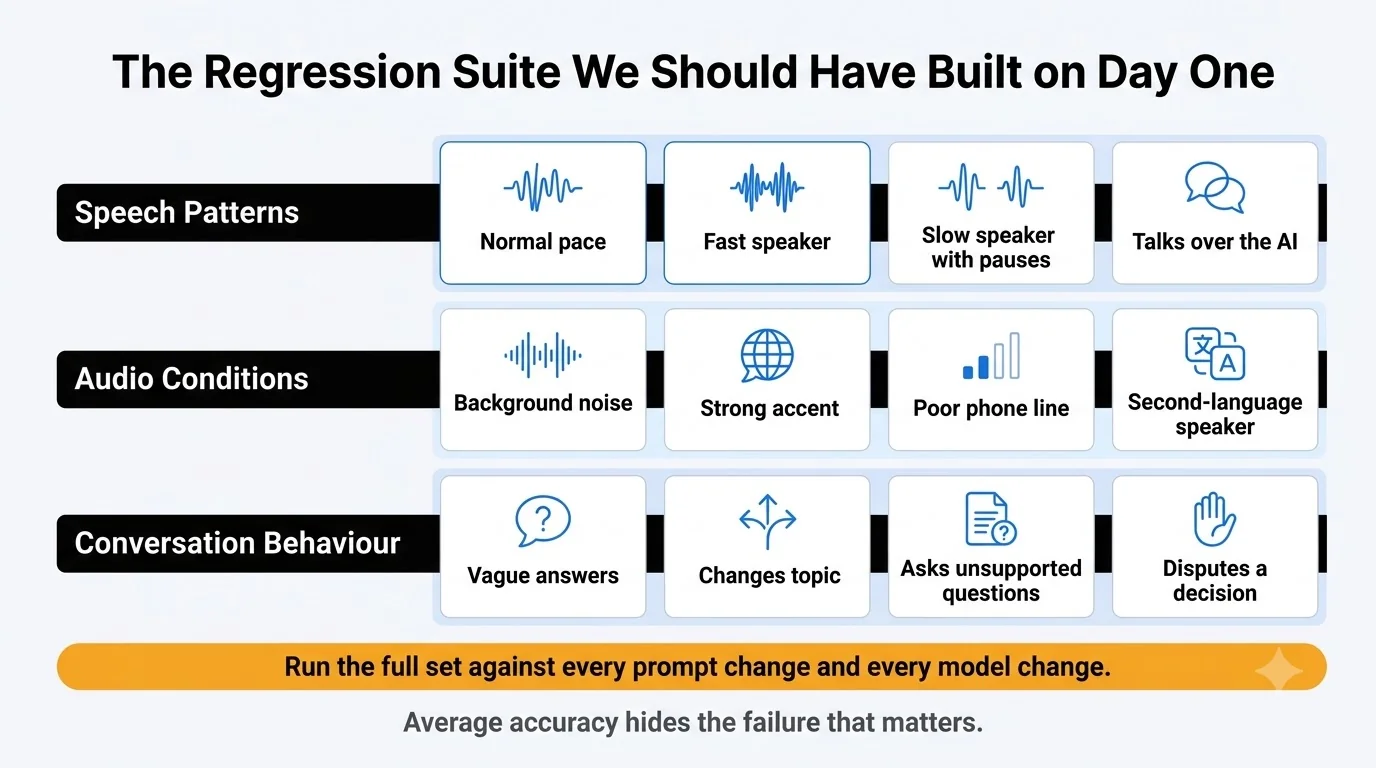
2. Evaluation Frameworks on Day One- Not After Something Breaks in Production
We should have had evaluation datasets from the beginning.
Create test calls for:
- Normal candidate
- Fast speaker
- Slow speaker
- Strong candidate
- Weak candidate
- Ambiguous candidate
- Angry candidate
- Candidate who changes topics
- Candidate who interrupts
- Candidate with background noise
- Candidate who asks unsupported questions
Every prompt or model change should be tested against the same dataset.
That creates a regression suite for the agent.
3. Recruiters in the Room When Prompts Are Being Written
Developers know how systems work. Recruiters know how interviews work.
Both perspectives are necessary.
A developer may write a technically correct question. A recruiter may immediately recognize that the question does not help evaluate the candidate.
Prompt design should therefore involve the people who understand the workflow.
The best conversational AI is not created in isolation by the engineering team.
It is created with the people who actually use the system.
Where Voice AI in Hiring Goes From Here
The first generation of voice AI proved that machines could hold a conversation.
The next generation will need to do much more than talk. It will need to understand context, make decisions within defined rules, handle exceptions, and move candidates through an entire workflow.
That shift from conversation to workflow is where voice AI in hiring gets much more interesting.
1. Adding Video to the Same Agent- What That Actually Changes
Voice is only one part of where these systems can go next. Adding video introduces another layer of interaction, turning the agent into a truly multimodal system.
A candidate could:
- Speak with the agent
- Share a document
- View or complete an onboarding form
- Complete a task on screen
- Ask questions verbally while interacting with the interface
The architecture starts to look like:
Voice + Vision + Text + Tools
But multimodal does not automatically mean better. Video should be introduced when visual context adds real value to the workflow not simply because the technology makes it possible.
2. Sentiment and Emotion Detection During the Call Itself
Voice contains more than words.
The system can analyze:
- Speaking pace
- Pauses
- Interruptions
- Volume
- Certain conversational patterns
But this area needs caution.
A nervous candidate is not necessarily a poor candidate. A quiet person is not necessarily uninterested or disengaged. People also communicate differently based on their culture and personality.
So, emotion or sentiment signals should only be used to understand the conversation, not as an automatic factor in hiring decisions.
3. A Fully Autonomous Hiring Pipeline- How Far Off Is It Really
A future recruitment workflow could look like:
Application → Screening → Scheduling → Interview → Assessment → Reference Check → Offer → Onboarding
Technically, many individual steps can already be automated.
The harder question is governance.
The more AI influences hiring decisions, the more important human oversight becomes.
A practical model is:
AI handles repeatable work. Humans own consequential decisions. That balance allows organizations to gain efficiency without turning hiring into an opaque automated process.
4. Onboarding, Not Just Screening- The Next Use Case Nobody’s Built Yet
Screening is only one point in the employee lifecycle.
The same AI voice agent architecture can support onboarding.
A new employee could call or receive a call from the agent and ask:
- Where do I report on my first day?
- What documents are required?
- How do I access benefits?
- When is my training?
- Who is my manager?
- What shift am I assigned to?
- How do I complete a specific HR task?
The agent can retrieve approved information and trigger workflows through connected systems.
This turns the technology from a screening tool into an employee-facing conversational layer.
FAQs
What is a real-time voice AI agent?
A real-time voice AI agent can listen to what someone says, understand it, respond naturally, and take actions using connected software. Unlike a traditional IVR, it can have back-and-forth conversations and handle unexpected answers.
How does a voice AI agent work inside a recruitment call?
The basic flow is:
Audio → Speech-to-Text → LLM reasoning → Decision/Tools → Text-to-Speech → Audio
At the same time, the agent maintains conversation state and can interact with an ATS or other recruiting system.
What does it actually take to build one?
You need more than an LLM. A production AI voice agent typically needs:
- Telephony
- Streaming audio
- Speech-to-text
- LLM reasoning
- Text-to-speech
- Conversation state
- Prompt and policy controls
- Tool/API integration
- ATS integration
- Monitoring
- Evaluation
- Security
- Human escalation
- Failure recovery
The technology stack has matured enough that these components can now be assembled into production voice workflows, but orchestration remains the difficult part.
How accurate is AI screening compared to a human recruiter?
There is no single accuracy rate for every job. It depends on the role, questions, language, accents, audio quality, AI model, and evaluation method. The best approach is to compare AI results with human evaluations and track both how often they agree and important mistakes, such as wrongly rejecting a good candidate.
Can it replace the recruiter entirely?
No, and that shouldn’t be the goal. A good AI recruiter should handle repetitive tasks like screening, collecting information, scheduling interviews, creating summaries, and updating workflows. Human recruiters should own complex cases, candidate concerns, sensitive decisions, and final hiring decisions.
How do you keep latency low enough for a real conversation?
Stream the entire pipeline. Use streaming STT, fast end-of-turn detection, streamed LLM output, and start TTS as soon as possible. Keep services geographically close and monitor latency at each stage.
A practical target is 500–700 ms of voice-to-voice latency for a responsive experience.
What happens when the candidate says something unexpected?
The agent should first check if it can handle the request. If it has the answer from an approved source, it should provide it. If it can complete the task using an approved tool, it should do so. If it’s not sure, it should say so and ask a human for help. This is much better than making up an answer.
Recent Blog

How Voice AI Connects Calls With Sales Operations
October 15, 2026-
How GCCs Can Scale Engineering Teams with Staff Augmentation?
October 10, 2026 -
Asset Management Software for CFOs: From Depreciation to Capital Planning
September 29, 2026 -
Why Voice AI Is Different From Chatbots in Recruitment?
September 17, 2026