How AI Is Changing Asset Management Software: 5 Practical Use Cases Beyond Tracking

A maintenance team finds a compressor nobody has serviced in months. Finance carries it at a different value. The register puts it in Building B, but it moved two years ago. Then someone asks the obvious question: which record is actually right?
That’s the moment asset management software stops being a ledger and starts being a decision tool. You already collect the data. Where an asset sits and what it cost matter less than what the data says about its condition, its risk, and the next move.
AI fills that gap. The use of AI in asset management now works for mid-size teams that don’t have a data science department. It can flag assets likely to fail, catch records that look wrong, and show leadership where capital should go next. The five use cases below show how.
A quick word on scope. If you searched “what is digital asset management”, you’ll find answers about images, videos and brand files. We mean physical and IT assets here: pumps, forklifts, laptops, servers. This isn’t about asset management firms and their investment portfolios either.
Key takeaways
- Your register records history. AI turns it into calls on what to fix, write off or replace.
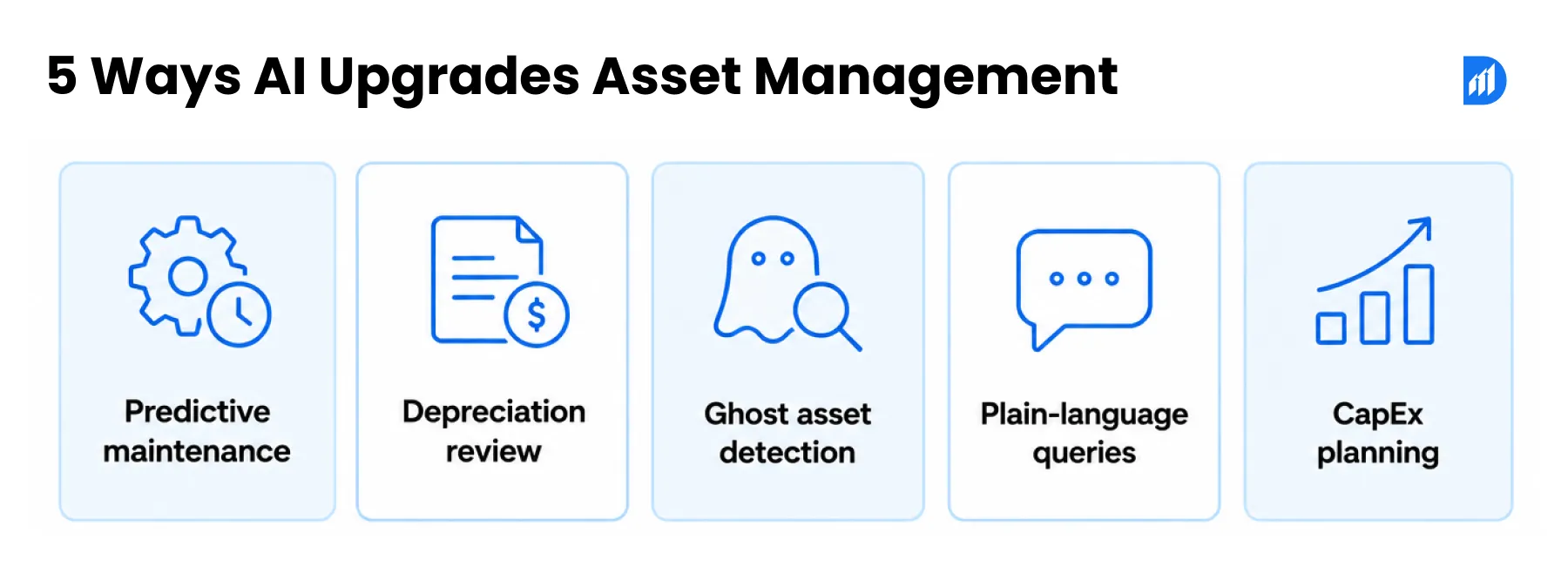
- Five uses pay off first: predictive maintenance, depreciation review, ghost asset detection, plain-language queries and CapEx planning.
- Finance and audit keep the final say. The model supplies evidence.
- Fix your asset IDs before you add AI to any asset management software.
Why Rule-Based Asset Management Systems Have Hit Their Ceiling
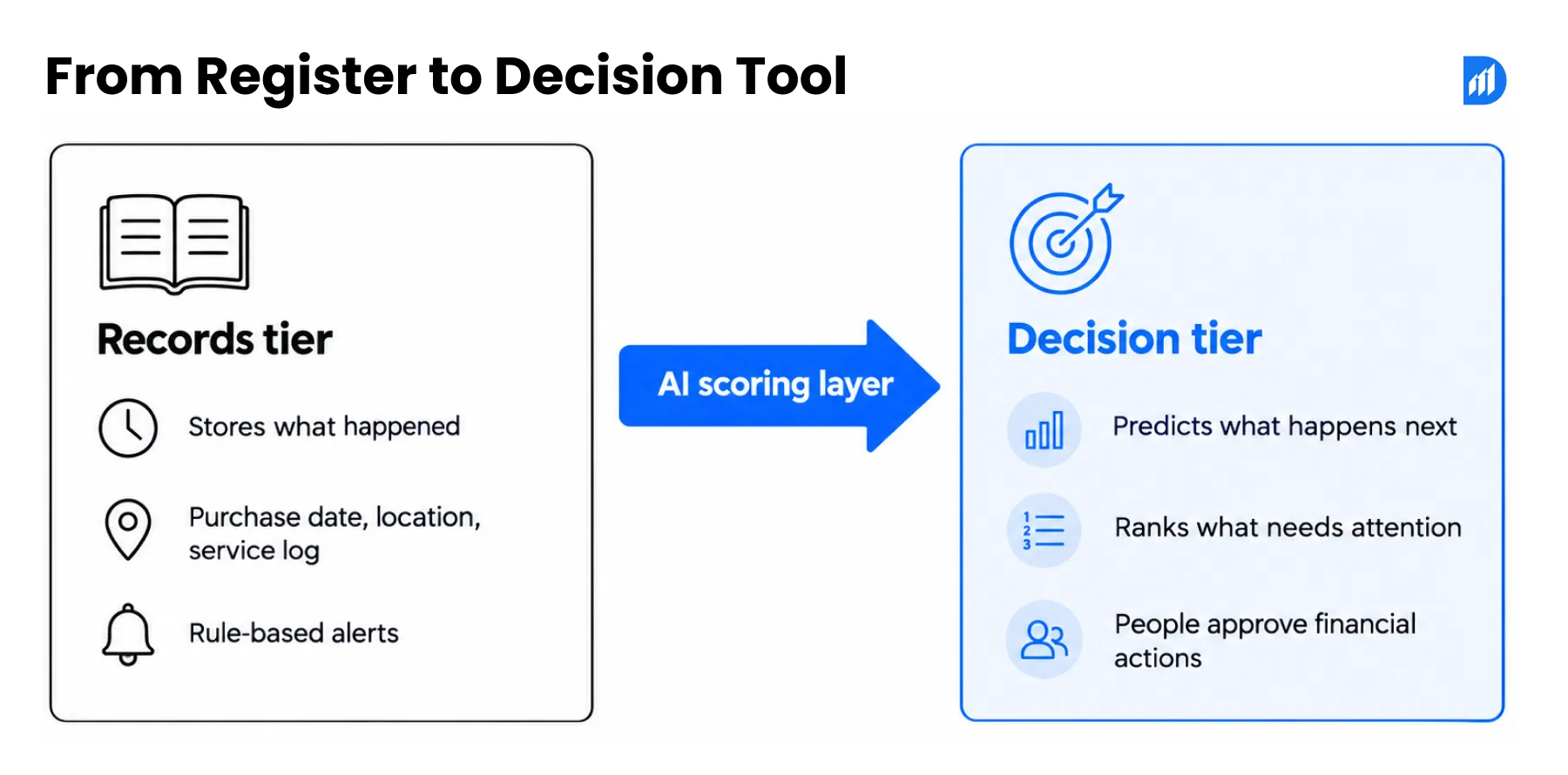
A records-tier system stores what happened to an asset: purchase date, location, service log. Its decision-tier counterpart reads those same records and predicts what happens next, then ranks what deserves attention first. The gap between them is the gap between a register and a decision tool, and most rule-based systems sit on the wrong side.
Picture a hospital with a few thousand pieces of medical equipment. The register lists every infusion pump, its purchase date and a 90-day service cycle. It can’t tell you that one pump has needed three repairs since spring, or that the ventilators on one floor fail more often than the rest.
That’s the ceiling of rule-based asset management software. Rules fire on dates and thresholds: service every 90 days, alert at 80% capacity. They can’t weigh a pump’s repair history against its ward and the cost of it failing mid-shift. Someone has to notice, and busy teams miss things.
Bad data blocks the next step more often than the software does. Gartner, McKinsey or IBM figure on how many organisations rate their asset data as unreliable] A model trained on duplicate tags and missing service dates just learns the mess faster. So you need one consistent asset ID and a named owner for every data field before AI arrives. Your current system doesn’t need replacing on day one.
Not sure where you stand? List the three asset questions your team asks every month and can’t answer quickly. That list is your starting point.
Use Case 1 – Predictive Maintenance: Condition-Based Intervention Using ML Failure Scoring
Predictive maintenance is the use case most teams try first, and the decision behind it is old and expensive: when do you send a technician? A fixed calendar can’t see a pump that runs a little hotter every week. A model can. Deloitte or McKinsey figure on downtime or maintenance cost reduction from predictive maintenance
1. Sensor Data Ingestion and Feature Engineering for Asset Health Models
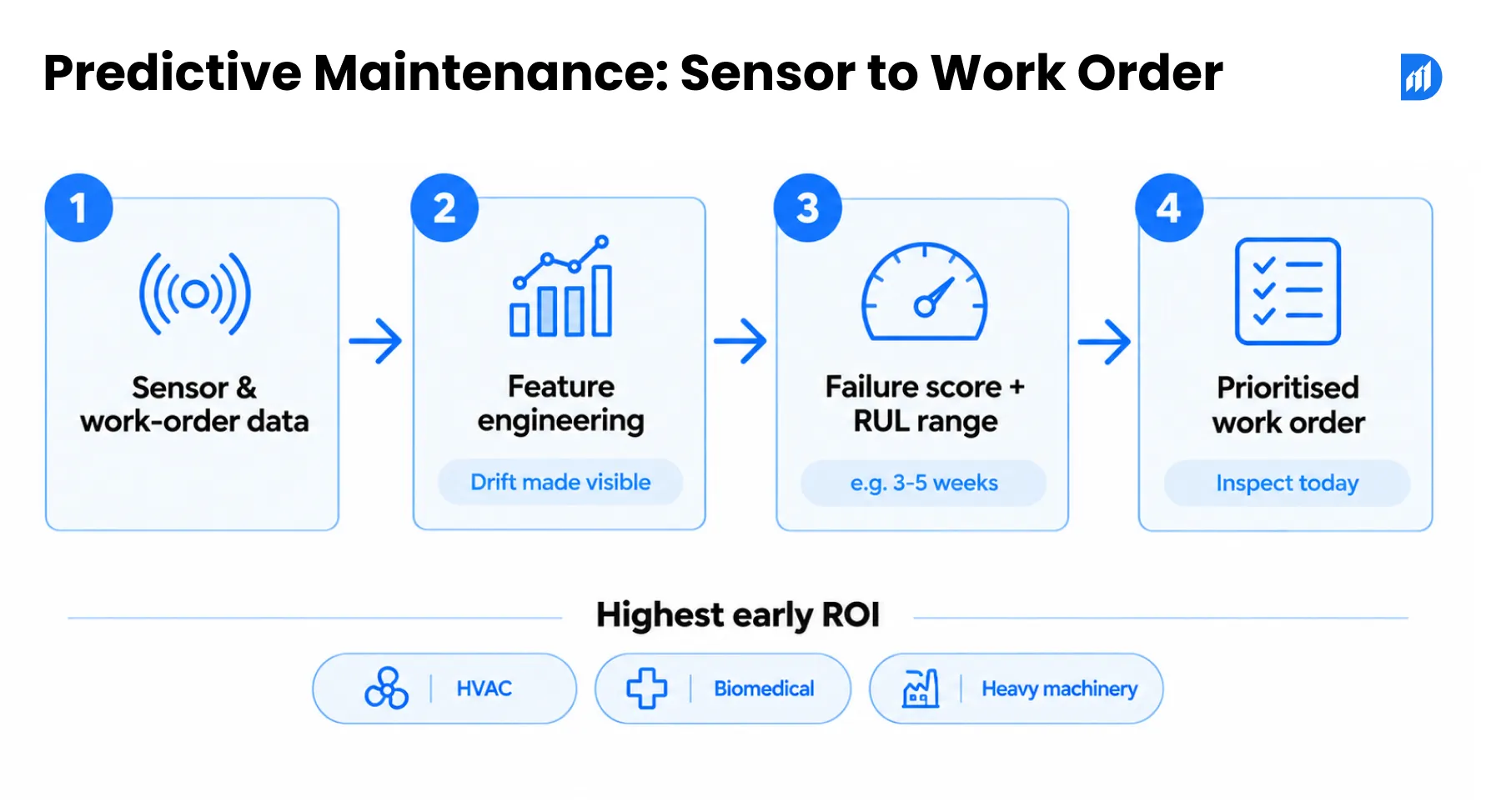
Sensors send a reading every few seconds. Raw readings are noisy, so engineers turn them into features: the seven-day average temperature, vibration against the baseline for that model, hours run since the last service.
Think of a rooftop chiller. One hot afternoon means nothing. Three weeks of temperatures drifting upward does. Feature engineering makes that drift visible to the model.
No sensors yet? Start with what your asset management software already holds. Work orders, repair counts, downtime and cost carry real signal, and you can build a first model from them.
2. Failure Probability Scoring – RUL (Remaining Useful Life) Calculation Methodology
A failure model learns from past breakdowns. It scores each asset’s chance of failing inside a set window, say the next 30 days, and estimates remaining useful life (RUL). Teams usually pick survival models or gradient-boosted trees, depending on how many failures they’ve recorded. Where failures are rare, anomaly detection flags odd behaviour instead.
Treat RUL as a range. “Three to five weeks” is honest. A countdown clock isn’t. A technician still weighs criticality and safety rules before acting.
3. Work Order Prioritisation Engine – From ML Output to Maintenance Queue
Thirty assets can trigger warnings in one week, and you can’t visit them all. A prioritisation engine ranks the queue by failure probability, criticality, production impact and spare-parts availability.
It then writes the result into your asset management software as a work order with a plain instruction: inspect today, or check at the next service. Technicians get a short list instead of a wall of red. You set the ranking rules, and they should change when your priorities do.
4. Asset Classes With Highest Predictive Maintenance ROI – HVAC, Biomedical, Heavy Machinery
These three pay back first, for different reasons. HVAC fleets are large and similar, so patterns repeat across units. Biomedical assets carry patient-safety and compliance stakes, so one missed failure costs more than the software. Heavy machinery, like a press line or a forklift fleet, loses money by the hour when it stops.
Curious what your own work-order history could predict? Pull one year of records for one asset class and start there.
Use Case 2 – AI-Augmented Depreciation Forecasting: Moving Beyond SLM and WDV
Depreciation is the quietest place where asset data and reality drift apart. Your ledger assumes an asset ages on schedule. Operations knows better.
1. Why Fixed Depreciation Schedules Diverge From Actual Asset Condition Over Time
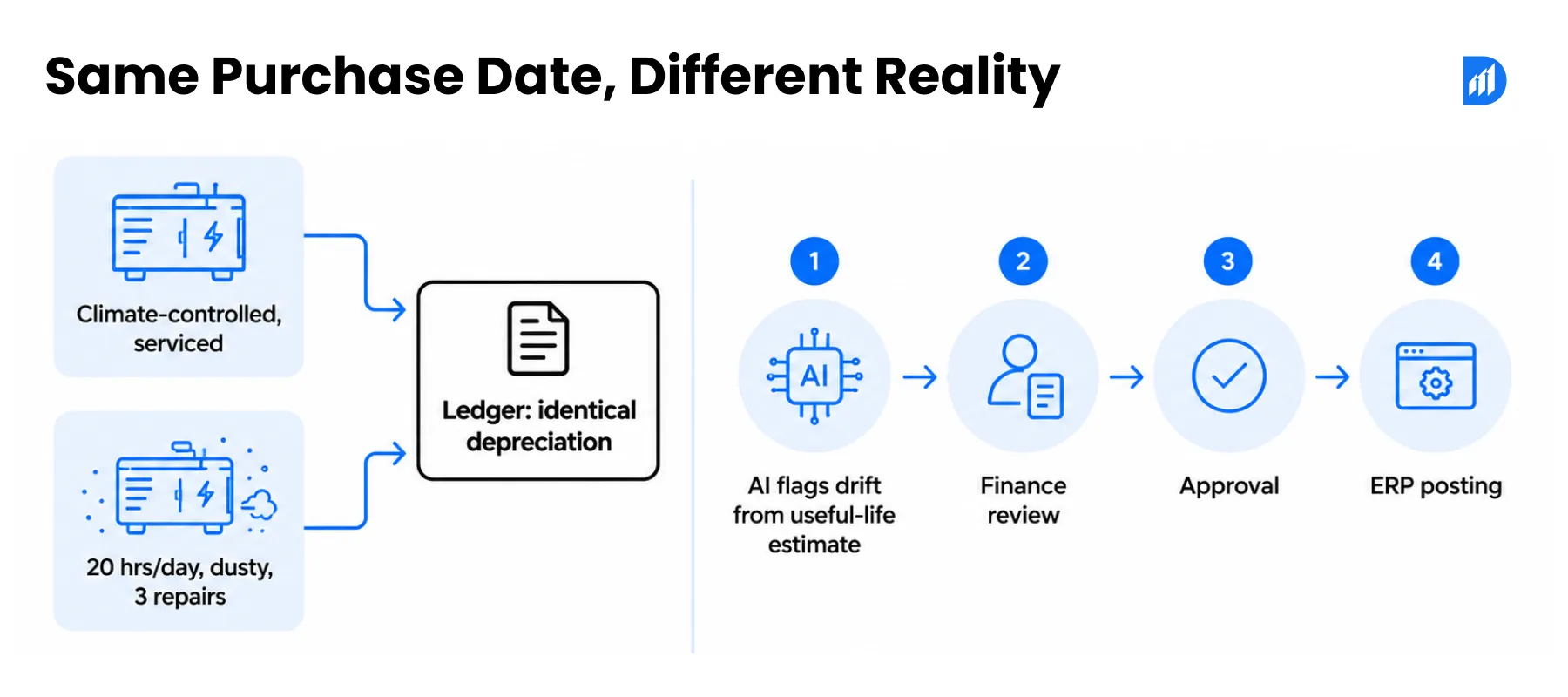
Take two generators bought on the same day. One sits in a climate-controlled plant with regular servicing. The other runs 20 hours a day at a dusty site and has had three major repairs. The books treat them identically.
Straight-line (SLM) spreads cost evenly over an assumed life. Written down value (WDV) front-loads it. Neither method looks at what the asset is actually going through.
2. Condition Adjusted Depreciation Models – How ML Recalibrates Useful Life Estimates
A model compares each asset’s original useful-life assumption with its operating hours, repair cost, downtime and the history of similar assets. Most of that evidence already sits in your asset management software.
The output isn’t a new depreciation figure. It’s a flag: this asset’s usage has drifted far from the original estimate. Finance decides what happens next.
3. Impact on Net Book Value (NBV) Accuracy and IFRS/Ind AS Compliance
IAS 16 and Ind AS 16 both expect useful lives and residual values to be reviewed at least at each financial year-end. Most teams do that review by spreadsheet, and thousands of rows get a quick glance at best. A flag gives reviewers a shortlist instead.
When finance accepts a change, it’s treated as a change in accounting estimate and applies going forward. Your NBV then reflects the asset you actually own.
4. Feeding Adjusted Depreciation Data Into ERP GL Postings Automatically
“Automatically” needs a careful definition here. The model never touches the ledger. The flow runs: signal, finance review, approval, then posting through your normal SAP, Dynamics 365 or Oracle process.
What you automate is the routing and the journal preparation after approval. Every step leaves an audit trail your auditor can follow.
Want to know how many of your assets have drifted from their original life estimate? A one-asset-class review will tell you.
Use Case 3 – Automated Ghost Asset Detection: Pattern Matching Against the Asset Register
A laptop is still assigned to an employee who left two years ago. Nobody has scanned or serviced it since. It might be lost. It might be sitting in a drawer. Either way, the record deserves a look.
1. How AI Identifies Anomalies Between Financial Records and Physical Inventory Data
A basic rule catches the obvious mismatch: inactive employee, asset still assigned. AI weighs more signals together, including scan history, maintenance activity, location, duplicate tags, ownership and disposal records.
No single signal proves anything. Several together justify a physical check, and that’s the point. The model narrows a register of thousands down to the few hundred records worth a person’s time.
2. Reconciliation Engine – Cross-Referencing Scan Data, ERP Records, and Location Logs
Your ERP says the asset exists. The scanner last saw it eighteen months ago. The location log puts it in a building you’ve since closed. A reconciliation engine lines up all three sources, using fuzzy matching on serial numbers and tags to catch typos and duplicates.
Traceability matters more than cleverness. Your asset management software should show an auditor exactly why a flag fired.
3. Automated Write-Off Workflow – From Ghost Asset Flag to GL Entry
The workflow runs flag, verify, approve, write off, update the register, post the entry. People approve. Software does the repetitive comparison and moves the paperwork.
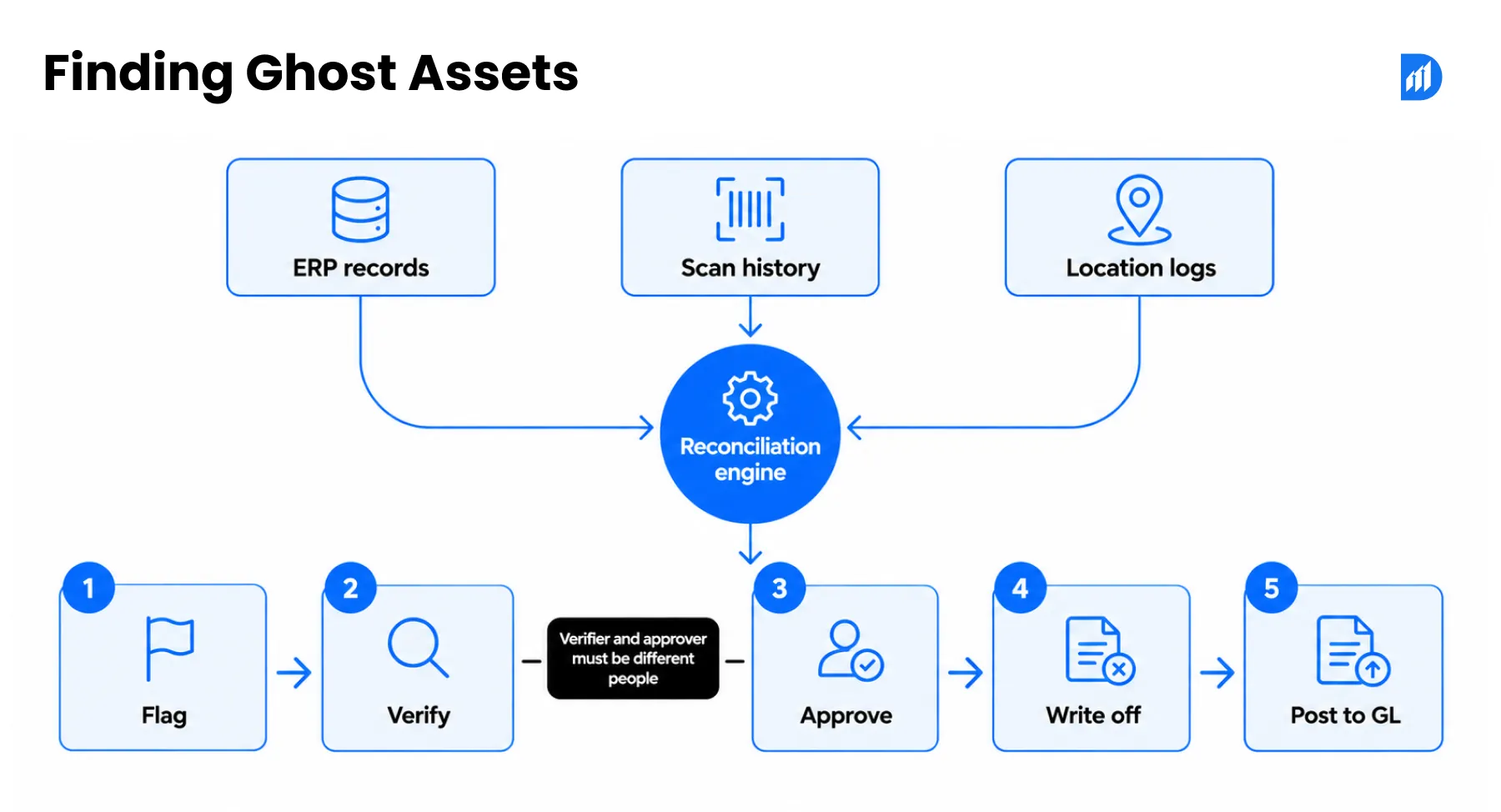
In a good setup, the person who verifies an asset can’t be the person who approves its write-off. Build that separation into your asset management software from the start.
4. Balance Sheet Impact – Correcting Overstated Asset Values and Depreciation Charges
Ghost assets distort the balance sheet because depreciation keeps running on things that no longer exist. Assets look larger than they are, and expenses are overstated every month.
Clean-up also changes your insurance and tax positions. Bring finance in early so nobody is surprised by the write-off number.
Next year’s audit is a cheap deadline to work against. Try the reconciliation on one site before it arrives.
Use Case 4 – NLP Query Layer Over Asset Database: Replacing Manual Report Generation
Most companies don’t lack reports. They lack answers. A finance manager wants to know which assets cost more to maintain each year than they’re worth on the books. Today someone builds a report, and it lands days later.
1. Architecture of a Conversational AI Asset Assistant – RAG Pipeline Over Asset Data
Plain version first: the assistant looks up the records, then writes the answer. Technically, that’s retrieval-augmented generation (RAG). Your asset master, work orders, inspection notes, service contracts and ERP values are indexed. A question triggers retrieval of the relevant records, and a language model writes a reply from those records and cites them.
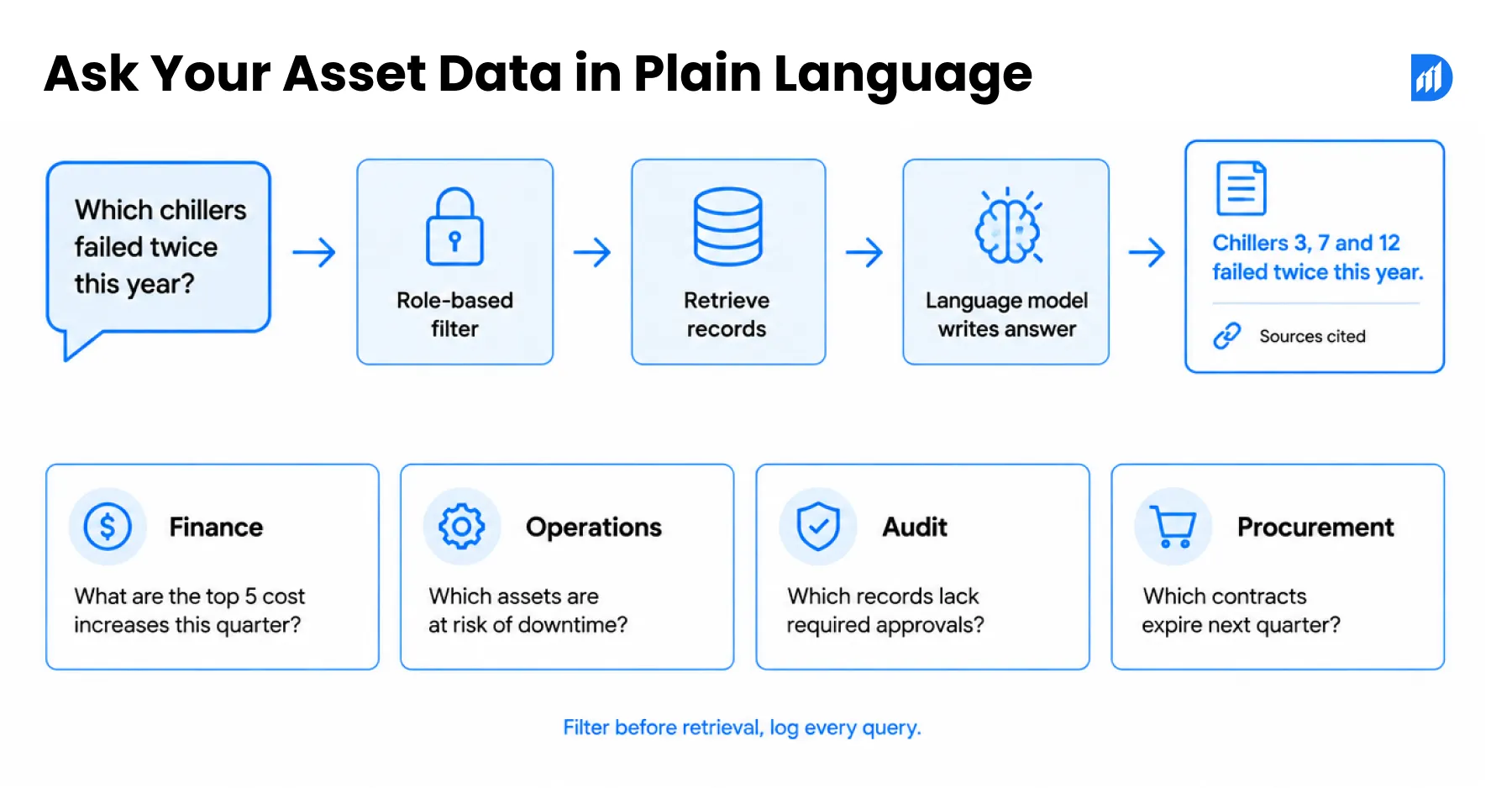
That retrieval step keeps the model from guessing. One caution on labels: tools sold as AI digital asset management tag and search files. They won’t answer questions about a compressor.
2. Query Types by Function – Finance, Operations, Audit, and Procurement Teams
Each team asks a different kind of question of the same asset management software:
- Finance: Which assets cost more to maintain than their book value?
- Operations: Which chillers have failed twice this year?
- Audit: Which assets have no scan in twelve months?
- Procurement: Do we already own an idle unit before we buy another?
Start with ten real questions from your team. If the assistant can’t answer them with sources, it isn’t ready.
3. Real-Time Data Retrieval vs Pre-Built Reports – Why Latency Matters for Decision Speed
A pre-built report answers yesterday’s question. A live query answers today’s. Match freshness to the decision, though. A daily refresh suits finance. Operations may need near real time.
People on warehouse floors and field sites often can’t type. They can talk. We’ve built a real-time Voice AI Agent that listens, thinks and decides, originally for recruiting. The same listen-retrieve-answer pattern can sit on your asset data.
4. Access Control Layer – RBAC Enforcement on Conversational Query Responses
Finance may see book values and depreciation. A technician needs service history and nothing financial. The assistant must inherit the same role-based access (RBAC) as your core systems, or it becomes a side door.
Filter records before retrieval, not after the answer is written. Log every question and every source, so you can answer an auditor who asks who saw what.
Try one thing this month: ask your team for the report they request most often, then time how long it takes to produce.
Use Case 5 – AI-Driven CapEx Optimisation: From Budget Assumptions to Data-Backed Investment Decisions
A plant manager asks to buy another forklift. Before finance signs, someone checks usage and finds two forklifts at a sister site sitting idle most shifts. The purchase request becomes a transfer request.
1. Asset Replacement Forecasting – Ranking Assets by Failure Probability and Maintenance Cost-to-Value Ratio
Age alone misleads. A model can rank assets by failure probability, repair cost against book value, criticality and utilisation. A moderate-risk asset can outrank a frequent-repair one if its failure stops a whole line.
Your asset management software then gives finance a ranked replacement list instead of a wish list.
2. Utilisation Analytics Pipeline – Identifying Underperforming and Idle Assets Before Procurement Approval
This is the first CapEx win, and it needs no fancy model. Usage data shows idle assets, duplicate capacity and equipment that moves between sites for no reason.
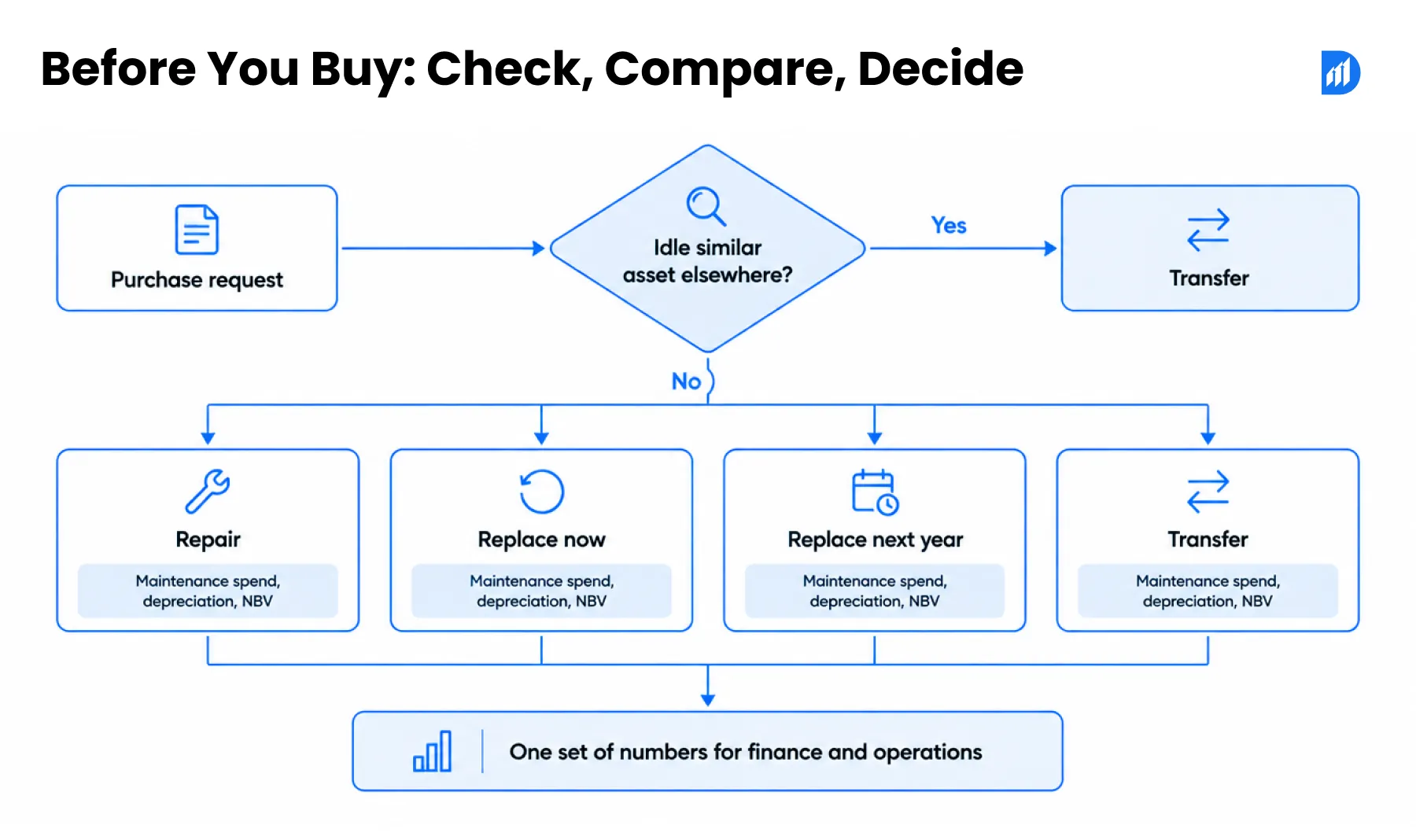
Add one rule to your approval process: no purchase request goes forward until someone checks utilisation of similar assets elsewhere in the company.
3. Scenario Modelling Engine – Projecting Depreciation and NBV Impact of CapEx Decisions
Then come scenarios: repair, replace now, replace next year, or transfer from another site. Each option gets projected maintenance spend, depreciation and net book value.
The model doesn’t decide. It gives finance and operations one set of numbers to argue over, which beats two spreadsheets that disagree.
4. Multi-Site CapEx Rollup – Aggregating Asset Health Data Across Business Units for CFO-Level Planning
A CFO reviewing five plants doesn’t want five formats. A rollup shows where repair costs are climbing and where large replacements are coming, in one view built from the same asset management software.
Take an asset management company in NYC that runs equipment across twenty commercial buildings. Each building manager buys their own boilers and pumps. A rollup shows head office which sites overspend on repairs and which ones already hold spare units.
That view moves the budget conversation from “who shouted loudest” to “where the risk actually sits.”
Pick the use case where a wrong call costs you most today. Start there.
Implementation Architecture – Integrating AI Asset Intelligence Into Your Enterprise Stack
Any vendor can show a beautiful forecast on clean sample data. Ask what happens on yours, with duplicate tags and missing service dates. The architecture below is what makes the difference.
1. Data Pipeline Architecture – IoT Sensors, ERP Sync, and Asset Register as Input Layers
Three inputs feed the AI layer: IoT sensors for condition, ERP sync for financial values, and the asset register for identity, location and ownership. One asset ID has to hold across all three.
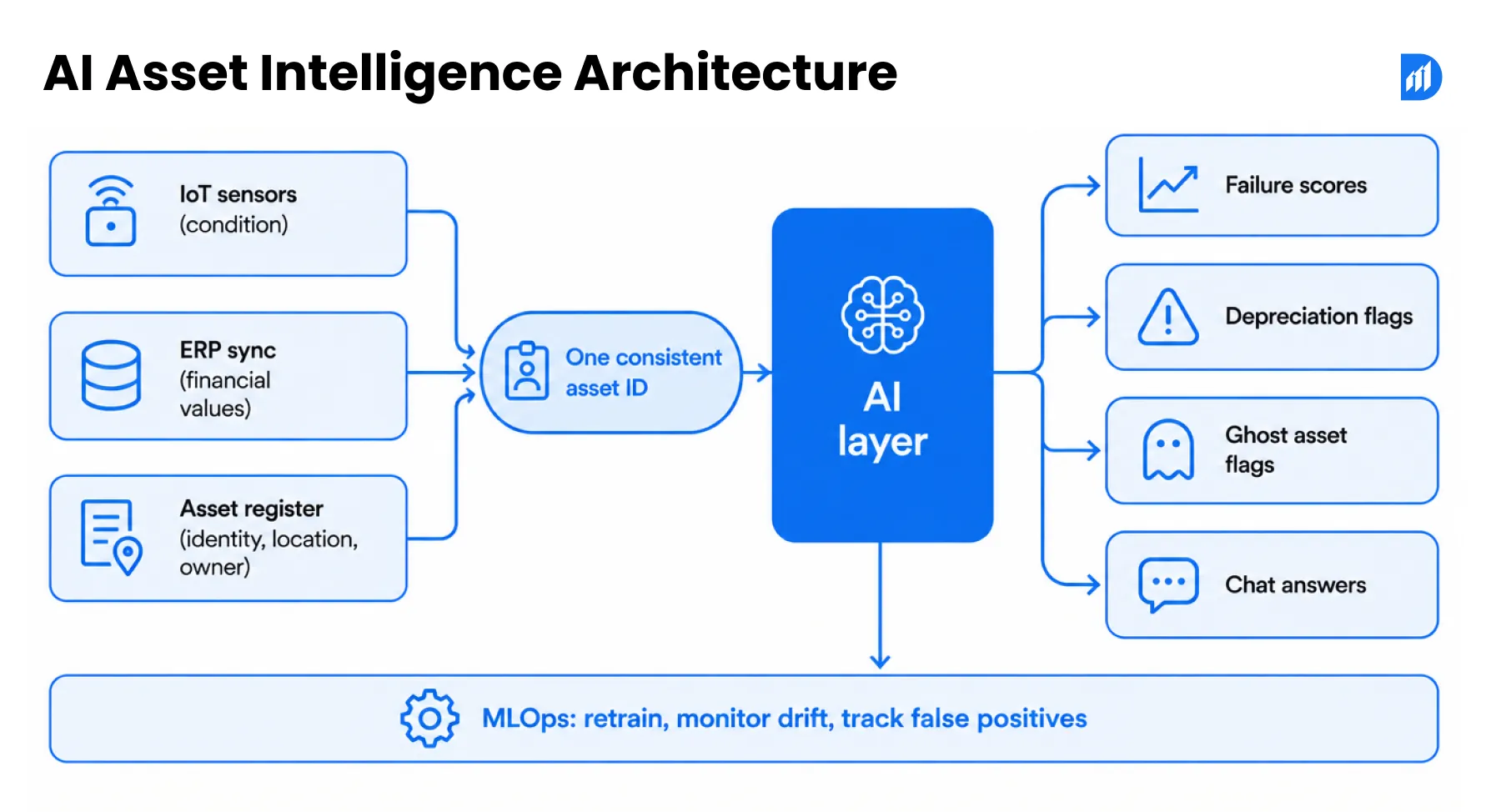
Good asset management software covers the full lifecycle: registration, verification, maintenance, AMC, transfer and disposal. If it can’t follow an asset from purchase to disposal, the AI layer has nothing solid to read.
2. ERP Integration Points – SAP AM, Microsoft Dynamics 365 FA, Oracle Fixed Assets
Decide which system owns each field before you connect anything. Typically the ERP owns cost and book value, and the asset system owns condition, location and maintenance history. Integration points differ: SAP AM, Dynamics 365 Fixed Assets and Oracle Fixed Assets each expose their own APIs and posting rules.
Write the ownership rules down. Most integration bugs come from two systems editing one field.
3. Deployment Model – Cloud-Native on Azure vs On-Premise Hybrid Architecture
Cloud-native on Azure gives you faster setup and easier scaling for IoT data. A hybrid model keeps sensitive records on your own servers, which some security teams and data residency rules require.
Watch the labels here too. Products marketed as cloud based digital asset management usually manage media files. Ask to see the record for a forklift before you go further.
4. MLOps Considerations – Model Retraining Cycles and Drift Detection for Asset Models
Models decay. A new supplier, a different operating shift or a firmware update changes how assets behave, and last year’s model gets less accurate. Plan a retraining schedule, monitor for drift, and track false positives.
If technicians start ignoring flags, that’s your drift alarm. Ask for a monthly report on how many flags led to real findings.
How Durapid’s Enterprise Fixed Asset Management Software Implements These Use Cases
We build custom AI and asset management software for teams who’ve outgrown their register. Two projects show the order we work in.
At CK Birla Hospitals, asset records were fragmented across facilities. We deployed our Azure-hosted platform across the network and consolidated everything into one central repository. Asset visibility moved from partial spreadsheet coverage to 100% real-time tracking.
At Fortis Healthcare, the goal was fewer critical breakdowns. We built an IoT-integrated maintenance engine on Azure IoT Hub and connected it to our Fixed Asset Management Tool.
Data first, intelligence second. The platform also supports Power BI analytics and conversational asset querying through generative AI.
FAQs
What is the difference between records-tier EAM and decision-tier EAM?
A records-tier system stores what happened: purchase date, location, service log. Its decision-tier counterpart reads those records and predicts what happens next, such as which pump will fail or which laptop has gone missing. The data can be identical. The difference is a scoring layer on top, with people approving anything financial.
How does AI calculate Remaining Useful Life (RUL) for physical assets?
The model learns from sensor readings, work orders and past failures, then estimates how much working life an asset has left under current conditions. It reports a range, such as three to five weeks, with a confidence level. Assets without sensors can still get an estimate from repair frequency, downtime and maintenance cost history.
How does NLP querying work on top of an asset database?
A retrieval step finds the relevant records first: asset master, work orders, contracts, ERP values. A language model then writes an answer using only those records and shows its sources. Because it retrieves before it answers, it doesn’t guess. Role-based access decides which records each person’s question can reach.
What data inputs does a predictive maintenance ML model require?
You need a consistent asset ID, service and work-order history, and a dated record of past failures. Operating hours, temperature and vibration readings improve accuracy but aren’t required to start. Fix duplicate tags and missing service dates first, because a model inherits every gap in your records.
How does AI-driven depreciation forecasting integrate with SAP or Dynamics 365?
The model never posts entries itself. It sends a flag to a finance reviewer, who approves or rejects the useful-life change. Once approved, the update follows your normal SAP, Dynamics 365 or Oracle posting process, usually through an API or a staged journal. The audit trail records who approved what and why.
What is a ghost asset reconciliation engine and how does it work?
It’s a matching routine that compares your ERP register, scan history and location logs, then lists assets where the sources disagree: no recent scan, an inactive owner, a duplicate tag. Each mismatch gets a score. High scores go to a person for a physical check before any write-off happens.

Recent Blog

Asset Management Software for CFOs: From Depreciation to Capital Planning
September 29, 2026-
Why Voice AI Is Different From Chatbots in Recruitment?
September 17, 2026