Real-Time Data Pipelines with Kafka and Databricks Delta Live Tables
At 2:13 AM, a payment suddenly looked off. There was a small delay, almost a twitch, money moving faster than usual with the sequence not quite obvious. It never really is. One company caught it in under three seconds. Another found the same transaction the next morning, buried inside a batch report that nobody opened before coffee. It wasn’t a smarter AI model that made the difference, and it wasn’t a bigger cloud bill either. It was the data pipeline, the unglamorous part everyone forgets.
Every click, transaction, sensor reading, customer interaction, and application log creates another piece of information. IDC estimates the world will generate over 394 zettabytes of data by 2028. Most businesses aren’t short on data anymore, they’re short on time. By the time yesterday’s reports land, today’s decisions have already been made.
This is exactly why real-time data pipelines have become the backbone of modern AI, analytics, fraud detection, and personalization. For teams exploring dedicated data engineering services, this shift is often the first architecture decision on the table. Instead of waiting for scheduled ETL jobs, organizations stream events continuously and process them as they happen. Decisions get made while the data is still useful, still sharp. That sounds simple. It rarely is.
Where the Real Difficulty Hides?
Moving millions of events every second without losing messages is one challenge, and handling schema changes while systems stay online is another. Data quality has to hold even when hundreds of producers publish at once. Scaling shouldn’t mean rebuilding the architecture every six months either.
Most streaming projects get far more interesting than the architecture diagrams imply, and this is exactly where Apache Kafka and Databricks Delta Live Tables (DLT) quietly became one of the most trusted duos in today’s AWS data pipeline and lakehouse world. Kafka keeps data moving and flowing through the system, while Delta Live Tables keeps that same data trustworthy and solid. Together, they form an AI data pipeline that does more than relocate information. It continuously checks the data, reshapes it, and readies it for analytics, machine learning, and enterprise applications, well before anyone needs to ask, “Can we trust this dashboard?” You know someone always does.
Why Real-Time Data Pipelines Matter for Modern Businesses?
Real-time data pipeline setups, the kind that power a modern AI data pipeline, cut fraud detection down from days to seconds using Kafka and Databricks.
By 2028, Gartner expects adoption of data streaming for agentic AI to pass 60%, up from less than 15% in 2025. That shift already shows up in how enterprises rebuild their systems, choosing Apache Kafka and Databricks Delta Live Tables over nightly batch routines.
Old-fashioned pipelines usually refresh dashboards every few hours. That kind of lag works fine for quarterly reporting. It’s a real risk, though, for fraud detection, inventory management, and even a marketing data pipeline running always-on campaigns.
Where the Time Gap Actually Hurts?
From enterprise data engineering work across BFSI, logistics, and retail clients, the batch-versus-streaming difference shows up first in incident response time. Fraud teams relying on a six-hour-old dataset react only after the damage is done, with the money already gone.
Modern data pipeline tools help close that timing gap. Apache Kafka plus Databricks Delta Live Tables is now one of the most common setups for production-level real-time pipelines. That holds true on Azure or AWS alike.
What Is a Real-Time Data Pipeline?
A real-time data pipeline is a setup that ingests, processes, and delivers data nonstop, with latency measured in seconds rather than hours. Unlike classic data pipeline tools that rely on scheduled jobs, it reacts the moment an event happens, not later.
Batch Processing vs. Real-Time Streaming
With batch pipelines, data gets collected over a set time window, then processed all at once in a single sweep. This works well for historical reporting, but it comes with a freshness gap, that familiar lag where things feel delayed. Real-time streaming handles each event separately, the moment it lands in the system.
Data engineering teams usually make this call early. A marketing data pipeline that tracks campaign clicks can often handle a 15-minute delay. A payments pipeline usually can’t, since waiting there carries real risk.
What Is Apache Kafka?
Apache Kafka is a distributed event streaming platform. It ingests, stores, and transports high-throughput data streams between systems in real time. It behaves like a central nervous system for today’s pipelines, keeping producers and consumers separate while everything keeps moving, even when the rest of the system isn’t perfectly in sync.
Key Features of Apache Kafka
Kafka’s setup is built around a handful of core abilities:
- Partitioned topics that enable parallel work across consumer groups, so several readers can process at the same time
- Durable, replicated logs that keep events around for replays and recovery when something goes sideways
- High-throughput performance, often handling millions of events each second on properly sized clusters
- Kafka Connect, including the Databricks Kafka connector and the Azure Databricks Kafka connector, for straightforward integration with downstream lakehouse platforms
Common Kafka Use Cases
Most enterprises use Kafka for fraud detection, clickstream analysis, IoT telemetry, and order management pipelines. In financial services especially, firms route transaction events through Kafka before those events ever touch a data warehouse, since even a two-minute delay can mean a missed fraud signal.
What Are Databricks Delta Live Tables?
Databricks Delta Live Tables, or DLT, is a framework for building and running dependable data pipelines. It works in a declarative way, not by writing orchestration code by hand.
Introduction to Delta Live Tables (DLT)
Instead of crafting custom Airflow DAGs for every dependency, DLT lets engineers define what the “final” destination table should look like. Databricks then handles the heavy orchestration work, including retries, checkpointing, and schema evolution.
Benefits of Using Delta Live Tables
DLT pipelines that follow the Medallion architecture (bronze, silver, gold layers) cut down manual pipeline upkeep by a lot. Teams also get automatic enforcement of data correctness through expectations, along with built-in lineage tracking. DLT naturally supports both batch and streaming workloads in the same codebase too. For teams weighing platform choices more broadly, our data engineering consulting breakdown covers how this fits into a wider upgrade plan.
Why Combine Kafka with Databricks Delta Live Tables?
Kafka handles ingestion at scale, the stream side of things. DLT takes on the transformation part, plus quality enforcement, then lands the data into storage in a clean Delta Lake format. Together, the two form one of the most dependable data engineering pipeline blueprints enterprises use when moving off legacy ETL.
How They Team Up: Kafka and DLT
Kafka topics are the streaming source. DLT pipelines read straight from Kafka using Structured Streaming, apply the required transformations, then write validated records into Delta Lake tables. This removes the need for a separate staging layer between ingestion and the lakehouse, making the whole flow feel more direct.
Why This Setup Is Useful
This combination shrinks the number of moving pieces in a data engineering stack. Less custom scripting means fewer points of failure. On top of that, data quality expectations catch schema drift before it reaches a gold-layer table, the kind that might feed a Power BI dashboard or an AI model later on.
Architecture of a Kafka + Delta Live Tables Pipeline
A production-grade pipeline built this way roughly follows a layered, event-driven flow from source to consumption.
How Data Moves Through the Pipeline
The core parts are usually source systems, things like applications, IoT devices, and transaction systems. From there it’s Kafka topics for ingestion, DLT for transformation, and Delta Lake for storage. A consumption layer like Power BI or an AWS SageMaker model sits at the end.
For the flow from Kafka into Delta Lake: events land in Kafka topics first, then DLT picks them up through Spark Structured Streaming. From there, it performs bronze-layer ingestion, then refines that same information through silver and gold layers, with tighter data checks at every stage. The quality expectations tend to ramp up as the layers go on, and that is kind of the point.
Building a Real-Time Data Pipeline
This implementation follows a repeatable rhythm for any data engineering pipeline, whether it ends up on Azure Databricks or plain Databricks on AWS. The steps stay the same even when the environment changes.
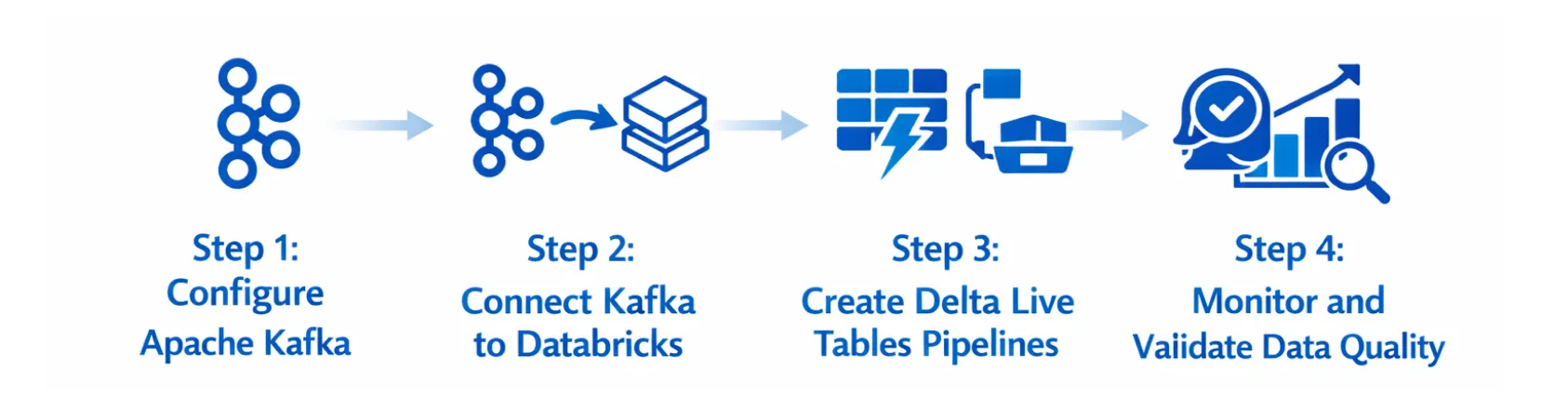
Step 1: Configure Apache Kafka Provision Kafka topics with partition counts that match expected throughput. Under-partitioning is one of the most common early missteps. It caps consumer parallelism later on, in a way that’s hard to fix after the fact.
Step 2: Connect Kafka to Databricks Use the Databricks Kafka connector, or the Azure Databricks Kafka connector for Azure-native deployments, to set up a Structured Streaming read from Kafka topics into a DLT pipeline.
Step 3: Create Delta Live Tables Pipelines Define the bronze, silver, and gold tables declaratively. Attach data quality expectations at each layer so bad records get flagged or quarantined instead of quietly affecting what comes after.
Step 4: Monitor and Validate Data Quality Use DLT’s built-in event log and lineage graph to track pipeline health. Set alerts on expectation failures too, so data pipeline management tools keep things proactive instead of reactive.
Common Challenges and How to Overcome Them
Kafka partition sizing, schema drift, and cold-start latency are the three recurring themes across most enterprise data engineering pipeline deployments, especially those powering enterprise AI applications. Partitions that are too small end up throttling throughput. Schemas left unversioned can catch downstream consumers off guard without much warning. Cold-start latency can delay real-time decision-making, making low-latency architecture just as important as model accuracy.
Where DLT Earns Its Keep
This is also where DLT’s expectation framework earns its seat. Teams that enforce schema contracts at the bronze layer catch drift earlier, well before it reaches a gold table relied on for regulatory reporting.
That said, this architecture isn’t the right fit for every workload. Batch pipelines still win for monthly financial close, low-frequency reporting, or datasets that are just a few gigabytes. Streaming infrastructure adds overhead there with no matching upside. AWS Data Pipeline or Azure Data Factory remain sensible tools for those scheduled jobs.
One mid-sized logistics outfit, moving 12 million shipment events daily, ran batch ETL jobs that refreshed dashboards every six hours. After switching to Kafka plus Delta Live Tables, dashboard latency fell to under 90 seconds. The ops team started spotting route inefficiencies about 40 times faster than before, based on internal delivery data from a similar Durapid engagement.
Why Choose Databricks for Real-Time Data Engineering?
Databricks pairs naturally with Kafka to support a full AI data pipeline stack, and it works across both AWS and Azure. Batch and streaming merge into one lakehouse, without a big separation between the two.
Durapid’s data engineering practice brings real depth here, with 95+ Databricks-Certified Professionals and 150+ Microsoft-Certified Professionals. That team works across data engineering consulting engagements for BFSI, logistics, and manufacturing clients.
Since Durapid is a Microsoft Co-sell Partner, the teams build these data pipelines directly on Azure Databricks. From there, everything connects into wider enterprise AI initiatives that need fresh, validated information. Choosing between Databricks and other lakehouse platforms often comes down to the workload mix, a comparison we cover in our Databricks vs Snowflake breakdown.
Frequently Asked Questions
How long does it take to build a real-time data pipeline using Kafka and Databricks? Most enterprise builds take around 6 to 12 weeks, depending on how messy the source systems are. Pre-built DLT templates can cut that setup time by about a third.
Is Kafka mandatory, or could I go with AWS Data Pipeline instead? AWS Data Pipeline works well for scheduled, batch-oriented jobs, but it doesn’t offer native low-latency streaming. Kafka is the default choice whenever sub-minute latency actually matters.
What is the difference between Delta Live Tables and standard Databricks jobs? DLT is more declarative. It handles orchestration, retries, and data quality automatically. Standard jobs usually need custom orchestration logic built by hand for the same results.
Do I need separate data pipeline tools for batch and streaming workloads? No. Delta Live Tables can cover both in one pipeline definition, which cuts the need to run multiple parallel toolchains.
What industries get the most from Kafka plus Databricks pipelines? BFSI, logistics, and retail tend to see the quickest returns, whether that’s fraud detection, route optimization, real-time inventory visibility, or a marketing data pipeline feeding always-on campaign dashboards.
Getting Started
Getting started works best as a series of steps, not all at once. Moving to real-time data pipelines usually works best as a phased rollout, starting with one high-value use case before expanding from there.
Durapid’s data engineering services team can review your current architecture and map out a Kafka plus Delta Live Tables rollout that fits your Azure or AWS setup. Reach out if you’d like to schedule a technical architecture review, and we’ll line everything up.
Real-time data doesn’t ask for perfection on day one. It asks for a pipeline built to keep up, one that gets faster, steadier, and more trustworthy with every layer you add. That’s the real payoff behind combining Kafka and Delta Live Tables. It isn’t just speed for its own sake. It’s decisions made on data that’s still true when it matters most.

Recent Blog

Asset Management Software for CFOs: From Depreciation to Capital Planning
September 29, 2026-
Why Voice AI Is Different From Chatbots in Recruitment?
September 17, 2026