Databricks Unity Catalog: A Practical Governance Guide
Databricks Unity Catalog isn’t just “another” feature. It’s kind of the reason one team actually trusts its data while another spends Monday morning figuring out who changed what, and why.
It often starts with something tiny. Like a dashboard suddenly showing different numbers, or an AI model giving strange predictions. Or someone just accidentally edits a production table. Then comes the familiar rush into Slack, and after that, this awkward pause where nobody seems to know who owns the data anymore.
The whole situation almost never begins with the data itself. It starts with governance, with permissions that are scattered or unclear.
As orgs build bigger lakehouses, adopt Enterprise AI, and give hundreds of engineers, analysts, and data scientists access to the same platform, keeping everything organized becomes way more important than merely storing yet more data. Whether you’re evaluating Databricks vs Snowflake or already using one of these platforms, access controls, lineage, compliance, catalogs, permissions, and audit logs stop being “nice to have” checkboxes. They quietly turn into the base layer, the stuff the business leans on every day.
How Databricks Unity Catalog Changes the Game
That’s where Databricks Unity Catalog changes the tone. Rather than splitting permissions across workspaces, it gives organizations one central place. You manage data, AI assets, governance policies, all in one environment. Security rules apply consistently everywhere.
Simple idea, big effect. When people trust the data, they stop second-guessing every dashboard. Additionally, when governance becomes automatic, teams don’t keep hitting the same wall asking for access every other day.
And when your data foundation is finally sorta under control, building Enterprise AI feels way less like taking a gamble. It becomes way more like following a blueprint. In this guide, we’ll loosen things up and break down how Databricks Unity Catalog works. We’ll show why enterprises choose it as the default governance layer for modern lakehouse architecture. Finally, we’ll cover what actually matters when rolling it out in production.
What Databricks Unity Catalog Actually Is?
About 87% of enterprises don’t really know who actually accesses their sensitive data, and that lack of visibility creates compliance risk that averages $2.4M every year.
Governance, honestly, isn’t optional anymore. If you’re running Databricks at scale across different teams, cloud accounts, or regions, you need one central setup that can answer three really basic questions: who has access to what? where did the data originate from? and did we break something.
That’s where Databricks Unity Catalog comes in. It’s the unified metadata and access control layer on top of your Delta Lake. It enforces governance rules across all your data whether it’s SQL, Python, or streaming pipelines. Instead of attaching a separate tool, Databricks Catalog is built right into Databricks. Governance gets applied at execution time, not after the fact.
Databricks Unity Catalog uses a three-level namespace system to organize and secure data assets across your Databricks workspace. It replaces the older workspace-level Hive metastore with a central cross-workspace metadata repository that tracks every table, view, and external location. The layout is straightforward: Metastore > Catalog > Schema > Table. A metastore is the top-level container (you get one per cloud account region). A catalog organizes data by business domain or by team. Schemas group related tables together. Tables hold the actual data. This hierarchy helps you set permissions at any level. Give read access to an entire catalog for analytics teams. Give update access to one schema for data engineers. For untrusted queries, grant nothing.
Databricks Unity Catalog also connects with Delta Lake’s transaction log, so each read, write, and modification is recorded. You can follow lineage (which tables feed which dashboards). You get audit trails (who ran which query, when). Additionally, you get data quality metrics (how many records failed validation).
Why Data Governance Matters Now, Not Later
Three forces converge to make governance urgent in 2026: regulatory scrutiny, distributed data, and AI velocity all happening together. Each one pushes organizations toward better control and visibility.
Regulatory Pressure Is Real
Data governance violations now bring fines from $50,000 to $7.5M depending on jurisdiction and severity. Gartner research shows 63% of organizations had at least one data governance incident in the last 18 months. Importantly, Databricks Unity Catalog doesn’t prevent every incident, but it gives you an audit trail regulators expect. It’s proof that you knew who touched what.
Data Lives Everywhere Now
Most enterprises push data across multiple cloud accounts, multiple Databricks workspaces, and multiple regions. Without one shared governance layer, each workspace handles access differently. One team uses role-based access control, another uses job-level secrets, another hard-codes credentials in notebooks. This inconsistency is how data breaches start. Therefore, Databricks Unity Catalog gives you one consistent governance approach everywhere.
AI Teams Move Fast
When data scientists can reach anything without friction, they build faster. Yet ungoverned data access is exactly how sensitive information ends up in training datasets. This is a critical problem in enterprise AI rollouts where data quality impacts model reliability, not just performance metrics. Clearly, Unity Catalog lets you allow wide access but still keeps a clear audit trail for what was used and where.
From our experience working on 90+ enterprise AI projects at Durapid, the organizations that adopt Databricks Unity Catalog early tend to spend about 40% less time on governance reviews. Moreover, they catch data quality problems 3x faster than teams managing access by hand.
Core Components: What Unity Catalog Actually Controls
Metastore and External Locations. The metastore stores your metadata. External Locations point to where your data lives on S3, ADLS, or GCS. You set permissions on the location, not the bucket. A data engineer writes to an S3 path through Databricks without needing raw AWS credentials.
Three-Level RBAC. Role-based access control works at the catalog, schema, or table level. Owner can read and modify. Reader can only select. Executor can run stored procedures. You assign roles to users or service principals. One role assignment covers everyone who needs access. No per-person lists needed.
Data Lineage and Discovery. Databricks Unity Catalog automatically tracks which tables feed which notebooks and dashboards. When someone queries a table, the lineage shows instantly. This matters less for debugging, more for impact: if you change a column, which downstream reports break?
Audit Logs. Every read, write, and access attempt gets logged with the user, timestamp, and query. These entries flow to your cloud provider’s logging service (CloudTrail, Storage Insights, similar tools). Auditors see exactly who ran what, when they did it.
When to Use Databricks Unity Catalog
You should prioritize Databricks Catalog if any apply to your situation. You run multiple workspaces or plan to expand beyond one. You work with regulated data (healthcare, financial services, PII). You have cross-team collaboration needing granular access. You need to show data governance to auditors or compliance teams. Your data sits in external cloud storage like S3, ADLS, or GCS instead of Databricks managed storage.
For mid-market and enterprise organizations running more than 50TB of data, Databricks Unity Catalog usually breaks even within about 4 months. The time saved on manual access requests and compliance reporting covers the setup effort.
When NOT to Use Databricks Unity Catalog
If you run a single small workspace with one team, Databricks Catalog adds overhead you don’t need yet. The legacy Hive metastore works fine to start. Move to Databricks Unity Catalog when you grow beyond one workspace.
If all your data lives in Databricks managed storage and you never plan external user access, the security model is already restrictive. Databricks Catalog pays off when data crosses boundaries (between workspaces, cloud accounts, or organizations).
The Real Implementation: A Logistics Case Study
A mid-sized logistics company running Databricks across three regional workspaces (US, EU, APAC) faced a serious problem. Every workspace had its own governance rules, like separate planets. A data engineer in the US could query EU shipment data without restriction. When compliance asked who accessed what across regions, they couldn’t report it reliably.
This is exactly where professional data engineering services matter. They help not just for setup, but for choosing a governance model that scales with the business.
So the company deployed Unity Catalog across all three workspaces. They set up one metastore in a central account. Then they organized catalogs by function: shipment_ops, finance_reporting, customer_360. Data teams in each region got modify access to the schemas in their own area. Meanwhile, analytics teams were granted read-only access across all schemas. For finance, access was restricted to tables tagged with PII=false, so the sensitivity rules stayed predictable.
What happened after that was pretty stark. Access request processing time fell from 8 days down to 4 hours. Quarterly compliance reports went from about 2 weeks of manual log gathering to around 30 minutes. Additionally, a data quality issue in the EU (something quietly corrupting shipment timestamps) was detected in hours instead of days. Why? Because lineage tracking surfaced which downstream reports were impacted immediately.
Setup took 6 weeks total, roughly: 2 weeks planning the namespace hierarchy, 2 weeks migrating metadata from legacy metastores, and 2 weeks testing access rules before going live.
How to Implement Databricks Unity Catalog in Four Steps
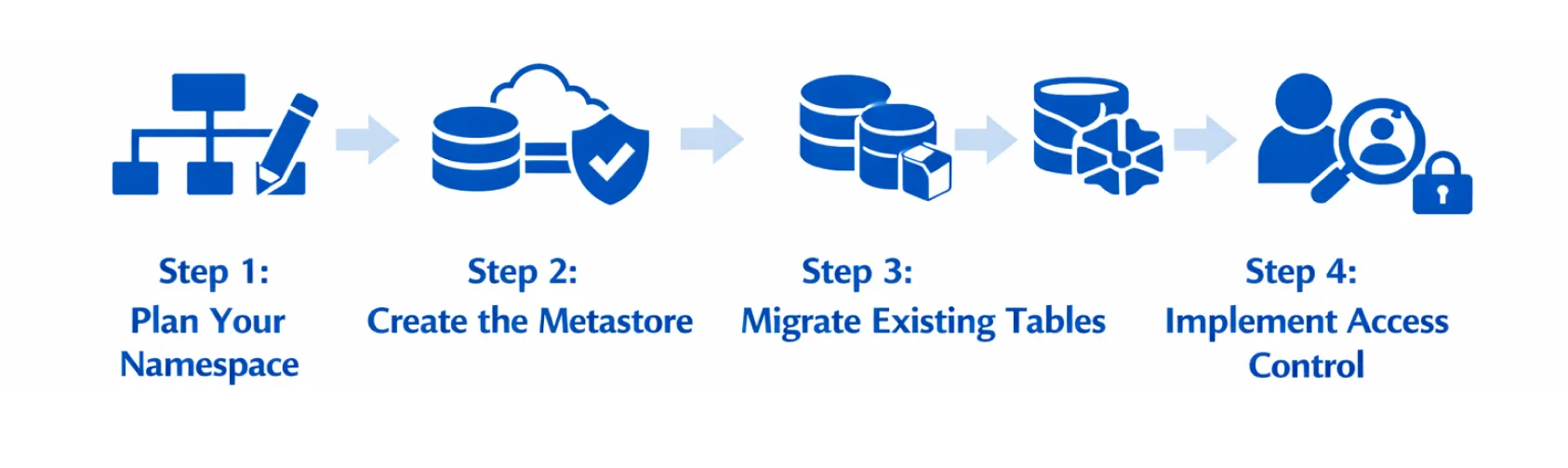
Step 1: Plan Your Namespace. Before creating the metastore, sketch out your catalog structure. Map it to your organization (one catalog per business unit or data domain?). One schema per team or source system? Spend a week talking with data owners. Get it right upfront. Restructuring later is painful. Data engineering consulting helps here by mapping your structure and avoiding common rework traps.
Step 2: Create the Metastore. Pick your cloud region. Create the central metastore (one-time setup). Set up an External Location pointing to your cloud storage bucket. Grant ownership to a service principal, not a person. This avoids key rotation issues.
Step 3: Migrate Existing Tables. If you have Delta tables in legacy metastores, register them in Databricks Unity Catalog. This doesn’t move data (it links the catalog to the same files). Zero downtime means operations continue.
Step 4: Implement Access Control. Assign roles to users and service principals. Start broad (give data engineers owner access to development catalogs, analysts reader access to production). Tighten permissions gradually as you learn who needs what.
Most enterprises finish this in 6 to 12 weeks, depending on the number of workspaces plus the overall data volume.
The Challenges Nobody Warns You About
Privilege Escalation Through External Storage. If a user can write to an External Location but only has read-only access to a Databricks Catalog table, they might read raw parquet files from the cloud bucket and bypass access policies. Grant External Location permissions carefully. Never hand those rights directly to regular users.
Migration Performance. Table registration can slow if you handle thousands of small tables. Batch the registration work. Use Databricks automation tooling to avoid endless manual steps.
Service Principal Key Rotation. Some teams hardcode credentials in External Location definitions. Keys expire or rotate, access breaks. Use a secrets manager like Databricks Secrets or your cloud provider’s key vault. Configure Databricks to refresh credentials automatically.
Key Benefits: The Numbers That Matter
Compliance Risk Reduction. Companies using Databricks Unity Catalog report 95% improvement in audit readiness. Instead of manually collecting logs, you export certified audit trails instantly.
Access Request Speed. Requests that took 3 to 7 days now finish in hours. One enterprise reported 80% fewer support tickets from teams requesting data access.
Incident Detection. With lineage tracking, organizations catch data quality issues 3x faster. They immediately see which downstream reports are affected.
Cost Containment. Access controls at the catalog level prevent accidental data copies and wrong-table queries. This cuts cloud costs by 12% to 18% in mature implementations.
The Bottom Line
Databricks Unity Catalog solves one very particular governance problem: how do you grant data access safely at scale? Without it, you end up doing this awkward thing. Either you lock the data down so tightly that analytics teams can’t actually work, or you open access too wide and basically pray nothing malicious happens. With Databricks Unity Catalog you can do both things. Be accommodating where teams need speed. Be more restrictive where compliance requires it. Everything gets logged, everything gets traced, every single step.
If your org runs multiple Databricks workspaces, handles sensitive datasets, or you’re under regulatory pressure, Unity Catalog stops being “nice to have” and becomes required. The lift is real, of course, but the time you save on access management, compliance work, and incident response pays you back within a few months.
At Durapid, we work with 95+ Databricks Certified Professionals who have deployed Unity Catalog across BFSI, healthcare, and logistics customers. If you’re planning a governance refresh or scaling Databricks across many teams, we can help. We assist with the namespace blueprint. We carry out the migration. We stand up the policies that match your organization.
Ready to move governance away from manual, breakable processes and into something automated and auditable? Let’s talk about your Databricks setup. Reach out to Durapid’s data engineering team.
Frequently Asked Questions
Q: Do I need separate Unity Catalog instances for dev and prod?
A: No. Use the same metastore with different catalogs (dev, prod). Grant separate permissions for each. It is honestly simpler than babysitting two metastores.
Q: Can I use Unity Catalog with Snowflake or Delta tables outside of Databricks?
A: Databricks Catalog is Databricks-only. If you need cross-platform governance you’ll lean on an external tool. That said, in most companies running Databricks, it becomes the unified analytics engine. Other platforms stay separate.
Q: How much additional overhead does Unity Catalog add to query performance?
A: Nearly none. Permission checks happen at parse time, not at execution time. A query that takes 10 seconds still takes 10 seconds, whether Unity Catalog is on or off. The overhead shows up in metadata activities like listing tables or verifying lineage, not in the real data scanning part.
Q: What happens if I migrate data but keep the exact same table names?
A: Totally supported. People will see the same table names, same schema, just with governance rules attached. No application changes required. Period.
Q: How does Unity Catalog manage cross-account access?
A: You give workspace objects read-only access to external locations that live in other accounts. The data stays in the source account. This is the approach multi-team, multi-account orgs use to prevent data sprawl.

Recent Blog

Asset Management Software for CFOs: From Depreciation to Capital Planning
September 29, 2026-
Why Voice AI Is Different From Chatbots in Recruitment?
September 17, 2026