Why Do Enterprises Need Generative AI Developers for AI Agent Development?
Generative AI Developers are becoming kind of the difference between companies that try AI and companies that actually get value out of it. Like, almost every org wants AI agents now. Agents that respond to customer questions, automate the little workflows, inspect documents, coordinate tasks, and make decisions way faster than any manual process could, on its own.
But here’s the catch: building an AI agent that’s actually useful is far more difficult than just plugging a large language model into some chat interface and calling it finished. An effective AI Agent Development effort needs more than prompt writing skills. You end up dealing with workflow orchestration, tool integrations, memory management, reasoning frameworks, security safeguards, plus the ability to connect AI systems to real business processes, not just demos. This is exactly where Generative AI Developers step in, because they’re the ones who can translate ideas into something operational. And as businesses go deeper into Custom AI Agent Development and Enterprise AI Agent Development, the demand for capable AI Agent Developers keeps climbing. More organizations are trying to Hire Generative AI Developers who can go past simple prototypes, building agents that handle real-world business tasks, at scale, consistently.
In this blog we’ll look at why AI agents have become a real business priority, how Generative AI Developers build those AI agents, and why teams using AI Agent Development Services are treating it as a key piece of their long-term AI strategy.
Why AI Agents Are Becoming a Business Priority?
87% of AI agent pilots stall before production. Generative AI developers fill that gap, sort of. Most companies seem to underestimate what AI agent development really takes. In a 2024 McKinsey analysis, orgs that actually deploy AI agents with dedicated engineering teams see 35% faster time-to-value than groups leaning only on no-code platforms, and that number lands pretty hard. From what we’ve seen across 90+ enterprise AI projects, the difference between a working demo and a production agent is mostly down to who builds it. Generative AI developers bridge it, turning prototype level automation into something more steady. Systems that deal with real customer data, real edge cases, and the messy business logic too.
Also, an AI agent is a software system that can perceive context, make decisions, and take actions autonomously, usually across multiple tools and APIs. Instead of static automation scripts, AI agents reason through ambiguous inputs using large language models.
Gartner is projecting that by 2027 40% of enterprise applications will include task-specific AI agents, up from under 5% in 2023 (Gartner, 2024). Honestly, the driver is pretty consistent: labor cost pressures and the need for 24/7 operational coverage.
In BFSI, logistics, and retail clients we’ve worked with, the usual trigger is the same thing again and again: manual workflows that don’t scale past a certain transaction volume. Like a claims processing team doing 200 cases a day manually can’t just jump to 2,000 without either headcount growth, or AI agent development.
The Role of Generative AI Developers in AI Agent Development
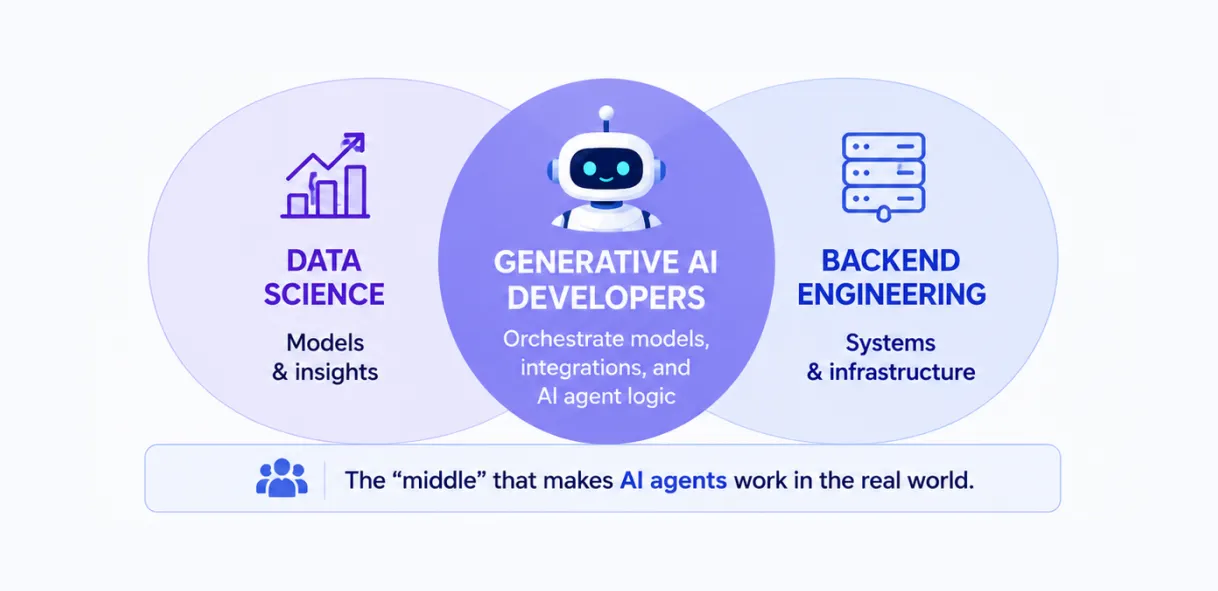
Generative AI developers design, build, and deploy the models, the orchestration logic, and all the integrations that let an AI agent sort of function inside a business environment. It sits right between data science and backend engineering, usually in a “middle” place people don’t fully talk about.
In practice, a generative AI developer’s work typically spreads across four layers: the LLM or foundation model layer (often Azure OpenAI or AWS Bedrock), then the orchestration layer (LangChain or Semantic Kernel), next the integration layer (APIs, databases, CRMs), and finally the evaluation layer (tests for hallucination, latency, and accuracy kind of nonstop). We keep seeing this failure pattern again and again with enterprise clients: teams hire a data scientist to “build an AI agent” without any backend help or DevOps support. What they end up with is a notebook that works, sure, but it never makes it to production. AI agent development needs the same engineering rigor as any other production software, plus model specific know-how around prompt design, token economics, and retrieval pipelines, even when the team is sure it’s “just an experiment”.
Durapid’s AI engineering teams, backed by 150+ Microsoft Certified Professionals, set up these efforts around AI Consulting Services first. That means scoping the agent decision boundaries before a single line of code gets written.
Building AI Agents That Understand and Take Action
AI agents kind of combine three core things: a reasoning engine, a memory or context store, and then a tool execution layer. The reasoning engine, usually some model like GPT-4o or Claude, reads what the user asks for, then basically figures out what to do next.
Then there’s the memory layer. It holds the conversation history plus any retrieved documents, often via a vector database such as Pinecone or Azure AI Search. And the tool execution layer that’s where the agent actually performs the actions: things like running a database query, sending an email, updating a CRM record, or calling some outside API.
A practical example helps. Say a customer support agent gets a refund request. The reasoning engine handles the intent classification, the memory layer fetches the customer’s order history, and the tool execution layer consults the refund policy API before replying or, if needed, escalating to a human.
This cycle, sometimes called the ReAct pattern (Reason plus Act), ends up being core for many real-world agents built with LangChain or comparable frameworks. Making this loop dependable under load, while adding sensible backstop logic when the agent feels unsure, is usually where most of the engineering time goes.
Key Business Benefits of Custom AI Agents
Custom AI agents, when properly scoped, deliver measurable operational gains. A 2024 Forrester study found that enterprises deploying custom AI agents for internal operations saw a 30% reduction in average handling time for repetitive tasks (Forrester, 2024).
| Metric | Before AI Agent | After AI Agent | Improvement |
| Average ticket resolution time | 18 minutes | 4 minutes | 4.5x faster |
| First-response accuracy | 68% | 91% | 23-point increase |
| Agent escalation rate | 45% | 19% | 58% reduction |
These numbers represent a sort of mid-sized e-commerce client we worked with, processing about 8,000 support tickets per month. Once we deployed a custom AI agent, built on Azure OpenAI, with a FastAPI backend and linked into their existing Zendesk setup, the ticket backlog went from around 1,200 unresolved tickets to under 300 within six weeks. Kinda wild honestly, but it held.
The agent took care of order status, return eligibility, and shipping delay questions on its own, then only pushed the really tangled disputes over to human agents for review, or at least when things got ambiguous enough.
Why Off-the-Shelf AI Solutions Often Fall Short?
Off-the-shelf AI chatbot platforms kind of work for narrow, scripted scenarios but they tend to wobble the moment business logic gets specific? Like really specific. Most of the pre-built tools simply cannot connect to proprietary databases properly, they cannot enforce custom compliance rules, and they often don’t do multi-step reasoning across internal systems in a coherent way.
The main issue is flexibility. A ready-made customer service bot may answer FAQ style questions with decent results, but it won’t be able to check real-time inventory across three different warehouses, then apply a region-specific discount policy at the same time. That kind of stuff is where it quietly falls apart. And when companies try to force these off-the-shelf bots into complex workflows, they usually hit a wall somewhere around 3 to 4 months later, then they end up rebuilding from scratch. That duplicated effort is one of the most typical reasons AI agent projects go over their first budget estimates, by 50% or more.
Custom development just moves the complexity up front instead of discovering it mid deployment, and somehow that makes the whole thing less chaotic in the long run.
Essential Skills Generative AI Developers Bring to the Table
Strong generative AI developers mix model-layer know-how with classic software engineering kinda stuff, and honestly the skill set is wider than most hiring managers think.
Core competencies usually show up like this (not always in this order), but yeah: Prompt engineering and fine-tuning: getting the prompts structured right and, when it actually makes sense, fine-tuning smaller models for very specific domain work Orchestration frameworks: being comfortable in the weeds with LangChain, Semantic Kernel, or AutoGen, especially when you’re wiring multi-agent workflows together Vector databases and retrieval: putting together RAG pipelines, using Pinecone, Azure AI Search, or Chroma for the whole retrieval piece API and backend development: building sturdy integration layers, often around FastAPI or Node.js, and making sure it doesn’t crumble under load Evaluation and monitoring: setting up tracking for hallucination rates, latency, and cost per query once it’s in production so you can see what’s going on
A developer who skips the evaluation part is a common gap, it happens a lot. Without monitoring, teams tend to notice model drift or an uptick in hallucinations only after customer complaints and that’s not exactly the moment you want to find out, right?
Common Challenges in AI Agent Development
Even teams with good funding can still run into the same familiar roadblocks. In LLM pipelines, token limits mess things up, because agents start losing context during long exchanges. So they end up asking the same thing again or giving slightly conflicting answers like it never happened.
Then there’s latency, which keeps showing up. Multi-step agent reasoning, where the model sort of calls itself several times before it finally answers, can stretch the wait past 10 seconds. For end users it feels weirdly slow, not like real chat speed at all. Hallucinations are still the toughest one to truly tame. When an agent “sounds” certain while stating an incorrect order status or policy detail, that can turn into an actual business headache, especially in finance or healthcare, where correctness isn’t optional and compliance has teeth.
Cost control is another thing that often stays in the shadows until the first invoice lands. If an agent triggers many LLM calls for each user moment, and you multiply that across thousands of daily users, token spending can grow in ways you did not fully foresee. Unless you use caching or tier-based model decisions, instead of just running everything the same way.
Industries Seeing the Biggest Impact From AI Agents
Some sectors see faster, clearer returns from AI agent deployment based on transaction volume and process repetitiveness.
| Industry | Common Agent Use Case | Typical Impact |
| Financial Services | Fraud flagging, loan pre-screening | 40% faster initial review |
| Healthcare | Patient intake, appointment scheduling | 25% reduction in no-shows |
| Retail | Order support, inventory queries | 4x faster ticket resolution |
| Logistics | Shipment tracking, exception handling | 35% fewer manual escalations |
| Manufacturing | Equipment diagnostics, maintenance scheduling | 20% reduction in downtime |
Across Durapid’s work in BFSI and logistics specifically, the pattern holds: industries with high transaction volume and well-documented, rules-based processes see the fastest ROI from AI agents, often within 8 to 12 weeks of deployment.
How to Choose the Right Generative AI Development Partner?
Picking a development partner is kinda as important as the whole technology stack. A couple of simple criteria really helps to split dependable partners from the more risky ones, even if you think the pitch sounds good.
Try to find partners with an actual, verifiable delivery track record across different industries, not just AI demos and neat slides. Also ask very directly about their evaluation and monitoring approach, because that’s usually the part where internal teams stall out or just get busy and move on. Certifications still count, honestly. Partners with Microsoft Co-sell Partner standing (or something comparable in cloud certifications) have generally already gone through technical checks that independent freelancers might not. Durapid holds Microsoft Co-sell Partner and SAP Premium Partner status, with 95+ Databricks-Certified Professionals in house, so it isn’t only theory.
And lastly, ask how they treat post-deployment support. AI agents need continuing tuning as usage patterns shift, not a one-time handoff. A partner without a clear maintenance plan basically leaves you dealing with model drift by yourself, which is not what you want later on.
When NOT to Build a Custom AI Agent?
Custom AI agent development is, kind of, not always the right fit for every scenario. Like if your use case is a simple FAQ bot with fewer than 20 static questions, then grabbing an off-the-shelf tool is usually faster and cheaper honestly.
Also, if your organization doesn’t have clean, easy to access data sources, building the agent first turns into a data integration effort that you might not have budgeted for. So yeah, get data accessibility sorted before agent development. And teams that don’t have a budget for ongoing monitoring should think twice. In a compliance-sensitive industry, an agent that nobody checks, can create more risk than the manual process it replaced.
The Future of AI Agent Development for Businesses
Most businesses are still figuring out how to deploy a single AI agent properly. Meanwhile, the next shift is already underway. Instead of one agent handling everything, companies are starting to use multiple specialized agents that work together. One agent gathers information, another analyzes it, and a third takes action. Frameworks like AutoGen and CrewAI are early examples of where AI agent development is headed.
This is why businesses that hire generative AI developers today are building an advantage that compounds over time. Teams that understand agent architecture now will have a much easier time adopting multi-agent systems later, instead of trying to catch up when the technology becomes mainstream.
Ready to Build an AI Agent That Actually Delivers Results?
A lot of AI agents look impressive in demos. Far fewer survive real production environments. The difference usually comes down to architecture, integrations, and the people building them. If you’re exploring AI Agent Development for your business, the Durapid team can help you evaluate the right use cases, define a practical roadmap, and build agents that create measurable business impact.
Frequently Asked Questions
What does a Generative AI Developer do?
A Generative AI Developer builds, deploys, and integrates LLM-powered systems. Their work includes model selection, prompt engineering, orchestration, and production deployment.
How are AI agents different from chatbots?
Chatbots typically follow predefined flows. AI agents can reason through requests, access tools, and complete multi-step tasks across different systems.
Why do businesses invest in custom AI agents?
Custom AI agents can connect with internal systems, follow business-specific rules, and automate workflows that off-the-shelf tools cannot handle effectively.
How long does AI agent development take?
Most enterprise AI agent projects take between 8 and 16 weeks. Simpler, single-workflow agents can often be deployed much faster.
Which industries benefit most from AI agents?
Financial services, healthcare, logistics, retail, and customer support teams are seeing some of the fastest returns from AI agent adoption.

Recent Blog

How Voice AI Connects Calls With Sales Operations
October 15, 2026-
How GCCs Can Scale Engineering Teams with Staff Augmentation?
October 10, 2026 -
Asset Management Software for CFOs: From Depreciation to Capital Planning
September 29, 2026 -
Why Voice AI Is Different From Chatbots in Recruitment?
September 17, 2026