What is vista: AI Video gen agent?
Everyone is talking about AI video tools right now. But the real user experience is often very different from what the marketing promises. You still have to write the script, fix the visuals, adjust the pacing, and piece everything together into something that actually flows. The tool might be “AI-powered,” yet you are still doing most of the heavy lifting.
The first time you use vista: ai video gen agent, though, you get a different feeling. It does not just assist you. It acts like an agent that understands what you need and handles the job from beginning to end. You give it direction, and it manages the writing, the visuals, and the full production without you having to supervise each step. That shift from tool to agent is what separates Vista from platforms like Opus Pro, OpusClip, and the AI video features Meta is slowly rolling out.
This connects directly to the broader move toward open AI agents, where AI takes control of entire workflows instead of just helping humans complete individual tasks. The industry is heading toward systems that use AI for decision-making and output generation, whether in content production, AI-powered video KYC, or AI customer service agent operations.
If you have been looking for a video creation tool that actually simplifies your process, vista: ai video gen agent is worth a close look. It is built to be that all-in-one solution the market has been missing.
What Is the Vista: AI Video Gen Agent?
What if you could turn a basic idea into a complete, ready-to-publish video in under five minutes, with no camera, no production crew, and no video editing? Vista: AI video gen agent does exactly that. It is an AI system that functions like an agent. It takes either a text input or a URL and produces a finished video from it. For businesses currently spending between $8,000 a nd $15,000 per production cycle, this changes the economics completely. According to the 2024 Synthesia enterprise benchmark, teams using agentic video tools cut their per-video cost by 60% within the first quarter of deployment.
Vista is an agentic AI video creation platform. It is built on open AI agents and large language model orchestration. The system connects four components into one automated pipeline: a script-writing agent, an AI avatar renderer, a voice synthesis engine, and a media assembly layer. You provide a topic, a URL, or rough notes. Vista handles everything else.
Vista creates new videos from nothing, while tools like OpusClip and Opus Pro use AI to convert existing footage into new formats. No pre-recorded content is needed. There are no requirements for studio facilities or production staff either. The complete process runs through one interface, driven by AI agents working in sync.
This places Vista firmly in the category of agentic AI use cases, where multiple specialized models collaborate without needing humans to transfer tasks between stages. Gartner estimates that by 2026, more than 30% of corporate video content will include AI-generated elements, up from less than 5% in 2023. Vista is already leading that shift across marketing, training, and customer support teams.
How Vista Works: A Look at the Core Agent Pipeline
Vista runs through four successive agent layers. Each layer completes its task, then passes the output to the next one without any human intervention.
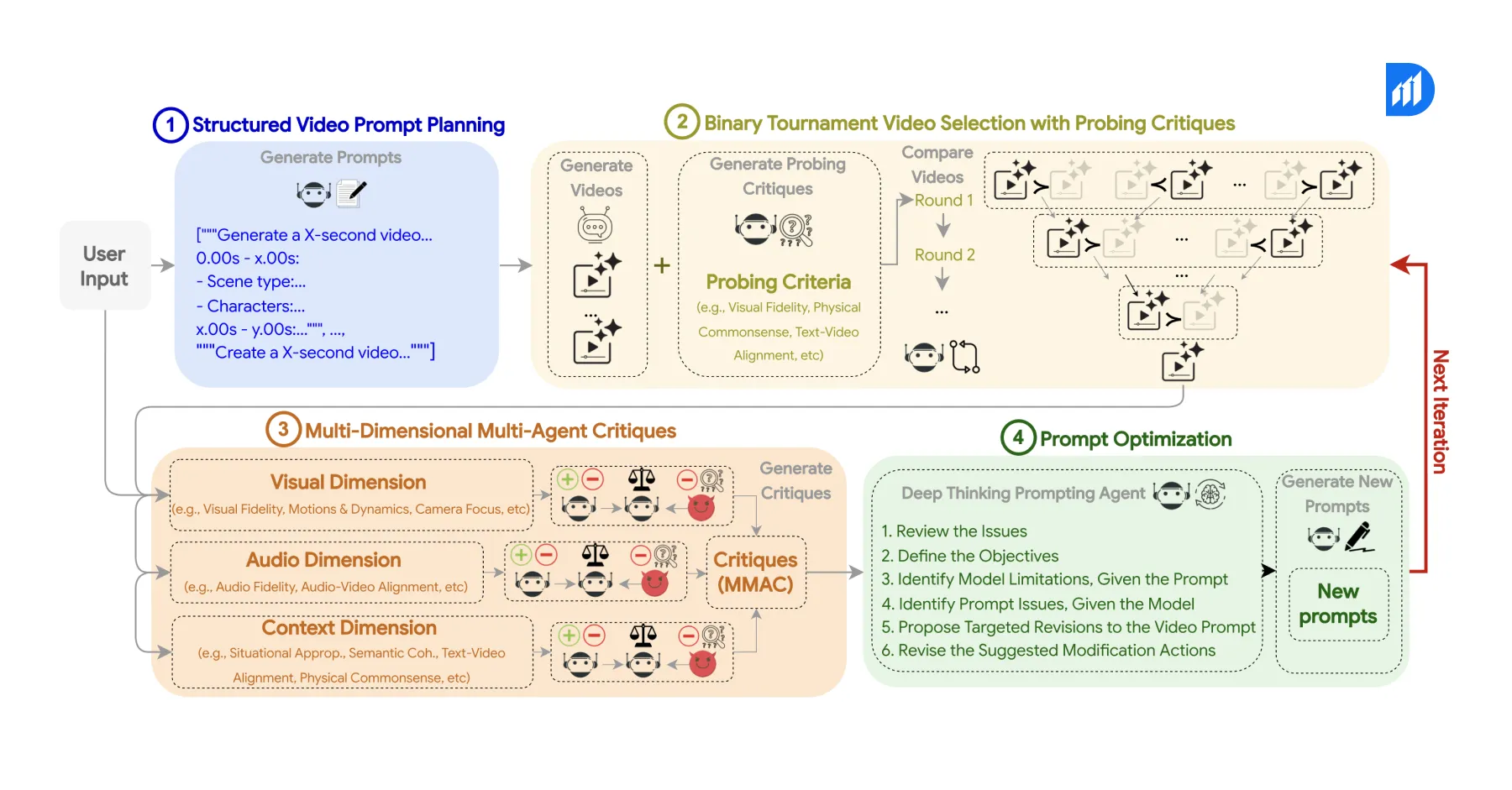
The script generation agent comes first. You feed it a topic, a product page URL, or even a few bullet points. The agent finds the main idea and builds a structured script with an introduction, a main section, and a closing call to action. For teams producing 20 to 50 short-form videos weekly, this single agent can replace a full-time copywriter.
The AI avatar service handles the second layer. This is also where the question of where to find AI avatar services for virtual assistants gets a direct answer. Vista includes a built-in library of photorealistic, studio-quality avatars. You pick one, and the platform maps the script to precise facial expressions, natural gestures, and frame-accurate lip sync. No green screen, no lighting setup, and no recording studio is needed.
Voice synthesis powers the third layer. Vista supports more than 120 languages with various accent and tone options. The voice agent reads the finalized script, applies pacing and intonation based on content type, and produces audio that matches the avatar’s mouth movements at a per-frame level. For global teams running multilingual campaigns, this removes a significant translation cost.
The media assembly agent completes the fourth layer. It combines the avatar video, voice track, background visuals, licensed stock footage, auto-generated captions, and brand assets like logos and lower-thirds into one output file. The finished video is ready to upload to YouTube, LinkedIn, Instagram, or any internal LMS platform without further editing.
One Tool for Everything: How Vista Compares to Multi-Tool Workflows
Most content teams currently stitch together three to six separate platforms to produce a single video. Scripting happens in one tool. Recording requires another. Editing demands a third. Captions need a fourth. Translation sometimes calls for a fifth. Every handoff between tools adds time, creates mistakes, and drives up cost.
Vista eliminates that entire chain. The comparison below shows what changes when teams switch from a traditional stack to the vista: ai video gen agent.
| Workflow Step | Traditional Stack | Vista AI Video Gen Agent |
| Scripting | Human writer or ChatGPT | Built-in script generation agent |
| Recording | Camera, studio, and crew | AI avatar, zero recording required |
| Editing | Premiere Pro, CapCut, or DaVinci | Automated media assembly |
| Captions | Rev.com or manual transcription | Auto-generated and synced |
| Translation | Human translator or third-party tool | 120+ language voices built in |
| Brand customization | Manual in post-production | Template-based, configured once |
| Time to publish | 3 to 7 days per video | Under 10 minutes per video |
Data from Synthesia’s 2024 enterprise benchmark report shows that teams using fully agentic video tools see a 78% drop in production time. They also report a 60% cut in per-video cost compared to hybrid human-plus-tool workflows. For a team producing 40 videos per month at $1,200 each, that adds up to roughly $576,000 saved per year.
This is also where vista: ai video gen agent sets itself clearly apart from Metaia and Opus Pro. Metaia generates social media clips from long-form video libraries. Meanwhile, Opus Pro is built specifically for repurposing podcasts and webinars. Vista, however, is a creation-first platform. It does not depend on existing footage. Instead, it starts from a blank input and produces a finished video entirely through AI.
Agentic AI Use Cases Where Vista Delivers Measurable Impact
Vista is not a general-purpose tool. It performs best in high-volume, structured video scenarios where speed and consistency matter more than cinematic quality.
AI Customer Service and Onboarding
AI customer service agent workflows and self-service onboarding are among the strongest fits. A 2023 Forrester study on video-based self-service found that companies replacing static FAQ pages with short video answers see a 34% improvement in issue resolution rates. As a result, Vista lets support teams produce 50 to 100 short explainer videos in a single day, each built around a specific product question or onboarding step.
Personalized Sales Outreach
AI marketing agents running personalized outreach campaigns use vista: ai video gen agent to produce custom video messages at scale. A sales team reaching 500 prospects can generate 500 unique intro videos in under an hour. Each video’s script references the prospect’s name, company, and pain point. That level of personalization at scale is only possible through a fully agentic pipeline.
AI-Powered Video KYC
AI-powered video KYC is a fast-growing use case, particularly in financial services and fintech. Vista’s avatar technology supports step-by-step identity verification guidance videos delivered in regional languages. Enterprise pilots have shown up to a 29% reduction in user drop-off during KYC flows when video guidance replaces text-based instructions. For platforms processing thousands of verifications daily, that improvement translates directly into revenue.
Compliance and Training
Regulated industries such as healthcare, insurance, and banking require annual re-recording of compliance content. Vista compresses what used to be a three-to-four-week production cycle into two to three hours, while maintaining consistent quality that meets audit requirements.
When NOT to Use Vista
Vista is a strong platform. But it is not the right answer for every video type. Testimonials, executive thought leadership content, and brand narratives that depend on authentic human presence cannot be replaced by an AI avatar without hurting viewer trust. Research from Edelman’s 2023 Trust Barometer shows that audiences assign 41% higher credibility to videos featuring real humans during high-stakes communications like investor updates or crisis messaging.
High-complexity productions requiring custom motion graphics, cinematic transitions, product demos involving physical interaction, and live event coverage still need traditional production workflows. Vista does not yet support advanced visual effects or real-world object integration.
The platform is also not ideal for one-off videos where setup time outweighs the benefit. If you are producing a single video that needs heavy creative direction, a traditional workflow will likely deliver results faster than configuring a Vista pipeline for just one output.
Implementation: How to Deploy Vista in an Enterprise Workflow
Enterprise teams need a clear three-stage process to bring vista: ai video gen agent into production successfully.
Stage One: Content Mapping
Start by identifying which video categories are high-volume, repeatable, and low on creative complexity. Customer onboarding explainers, product feature walkthroughs, HR policy updates, and FAQ response videos are strong starting points. These are the content types where vista: ai video gen agent delivers the fastest return.
Stage Two: Brand Configuration
Vista supports custom AI avatars trained on approved human likenesses, branded lower-thirds, logo overlays, color palettes, and intro or outro templates. Initial brand setup takes one to two hours. After that, every video produced automatically applies the configured brand elements.
Stage Three: Pipeline Integration
Vista provides a full REST API for teams that want to trigger video generation directly from a CMS, CRM, or marketing automation platform. An AI marketing agent or ai customer service agent built on OpenAI Agents SDK or LangGraph can call the Vista API as one step inside a larger automated content workflow. This is precisely where vista: ai video gen agent becomes a genuine part of an enterprise agentic AI architecture rather than a standalone tool.
Durapid’s AI and automation team helps enterprises design and integrate these pipelines. They reduce deployment time from weeks to days, so output quality meets brand and compliance standards from day one.
Ready to Scale Your Video Output Without Scaling Your Team?
Durapid builds AI-powered content and automation pipelines for enterprises that want to produce more without growing headcount. If your team is evaluating agentic AI use cases in marketing, training, or customer service, Durapid can help you assess, configure, and deploy vista: ai video gen agent within your current tech stack.
Talk to Durapid’s AI Solutions Team to book a discovery session.
FAQs
What is vista: ai video gen agent used for?
It turns a simple text input or URL into a complete, publish-ready video using AI avatars, voice synthesis, and automated editing. No camera, no studio, no delays — it just gets done.
How does Vista compare to OpusClip or Opus Pro?
OpusClip and Opus Pro both require existing video footage for ai-powered video repurposing. Vista starts from zero and creates everything from scratch, which makes it far better suited for high-volume content production at scale.
Can Vista support AI-powered video KYC workflows?
Yes. Its multilingual avatars guide users step by step through verification flows. Enterprise pilots have shown a measurable drop in users abandoning the process midway, which is the core goal of any KYC optimization effort.
Does Vista work with open AI agents or custom agentic pipelines?
It connects through a REST API, so you can plug it into existing agentic workflows. If you are building with OpenAI Agents SDK or similar frameworks, vista: ai video gen agent fits in without friction.
What content types are not suitable for Vista?
Anything requiring real human presence, such as executive interviews or live events, will not translate well through an AI avatar. Complex product shoots and productions needing custom visual effects are also better handled through traditional production.

Recent Blog

How Voice AI Connects Calls With Sales Operations
October 15, 2026-
How GCCs Can Scale Engineering Teams with Staff Augmentation?
October 10, 2026 -
Asset Management Software for CFOs: From Depreciation to Capital Planning
September 29, 2026 -
Why Voice AI Is Different From Chatbots in Recruitment?
September 17, 2026