Building Custom AI Copilots with Azure AI Foundry
In the age of generative AI, every organization is asking: How can we empower our teams with AI-powered assistants that actually work? The answer lies in platforms like Azure AI Foundry – Microsoft’s “AI application and agent factory” – which promises to make custom AI copilot solutions a reality for enterprises.
With Azure AI Foundry, we’re not just talking about chatbots; we’re talking about tailored AI copilots that integrate with your data, automate workflows, and boost productivity across the board.
In this blog, we’ll demystify how to build custom AI copilots using Azure AI Foundry. We’ll cover the step-by-step process for deploying copilots, explore how it bridges the AI agent framework with existing tools like Azure Cognitive Services and Logic Apps, and highlight the key benefits of enterprise AI copilots built on this unified platform.
Think of it as your inside look from a seasoned IT architect: examples, best practices, and technical insights, explained simply.
Ready? Let’s dive in!
What is Azure AI Foundry?
First, what exactly is Azure AI Foundry? In plain terms, it’s a new unified platform for enterprise AI operations, model builders, and application development. Azure AI Foundry brings together everything you need to design, customize, and manage AI apps and agents at scale. Imagine a factory assembly line, but for AI agents: you choose models, fine-tune them with your data, build multi-agent workflows, and deploy, all from one portal or SDK.
Microsoft describes Azure AI Foundry as a secure, flexible platform that hides the complexity of AI. “Everything – models, agents, tools, and observability, lives behind a single portal, SDK, and REST endpoint,” so developers can ship AI copilots to the cloud or edge with governance and cost controls from day one.
In other words, Foundry handles the heavy lifting: infrastructure, compliance, scaling, and even built-in responsible AI safeguards. You get enterprise AI without enterprise complexity.
Behind the scenes, Azure AI Foundry taps into the latest large language models (LLMs) and AI services. It gives you access to thousands of prebuilt models (Azure OpenAI models, popular open-source models, even models from partner organizations) and hundreds of agentic tools and templates.
Need a specialized vision or speech component? You can integrate Azure’s Cognitive Services into your copilot, too. In short, Foundry isn’t just a “tool”; it’s a comprehensive AI agent framework that manages your entire machine learning pipeline, from prototype to production, in one place.
How to build custom AI copilots using Azure AI Foundry?
At its core, building a custom AI copilot with Azure AI Foundry means assembling the right pieces: picking a model (or models), grounding it with your data, and orchestrating it with an agent workflow. But what does that look like in practice? Let’s break it down.
First, identify the use case or workflow you want to enhance. Are you automating document creation and analysis (like generating contracts or summarizing reports)? Improving customer support with intelligent chat? Extracting insights from meeting transcripts? The use case will guide your design: it tells you what data to feed in, what models to pick, and what integrations to plan.
Once the goal is clear, you start a new project in the Azure AI Foundry portal. Think of an “AI Foundry project” as your workspace. In this portal, you can explore a variety of tools. For example, Foundry includes a Templates gallery (in preview) with pre-built solutions like “Get started with AI chat” or “Get started with AI agents”.
These templates serve as quick-start guides: you can open them in GitHub to see sample code and architectures that match your scenario. It’s a bit like having a turnkey codebase and deployment script, complete with instructions.
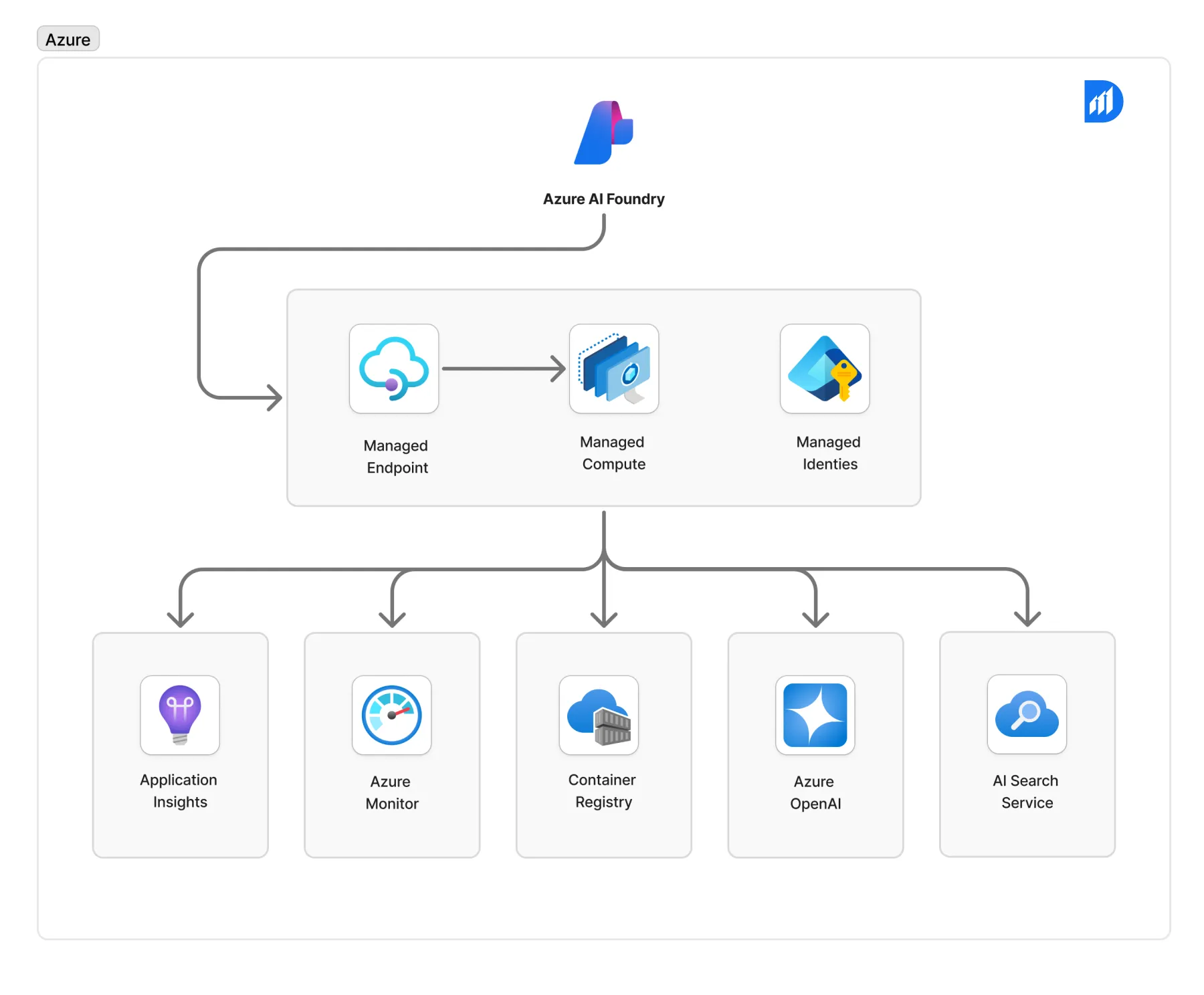
Under the hood, building your copilot usually involves a few core steps, which we’ll detail in the next section. But conceptually, here’s what happens:
1. Data grounding:
You feed your copilot with organizational data (documents, databases, transcripts, etc.). Azure AI Foundry can connect to Azure services like Azure AI Search or your own data lake. For example, many companies use retrieval-augmented generation (RAG) to ground an LLM in specific data.
In a retail chat example, a Foundry tutorial shows how to index product documents in Azure AI Search so the copilot answers questions from your catalog.
2. Model selection and customization:
You pick or train an LLM to power the copilot. Foundry gives you a model catalog of thousands of options, including the latest GPT models, Meta’s Llama, Mistral, and many open-source alternatives. You can also fine-tune or apply retrieval layers to tailor the model to your domain.
Foundry even supports fine-tuning models in the cloud, helping to create a custom model that “speaks your language.”
3. Agent orchestration:
Rather than a simple single-model query, many copilots behave like agents – they can call tools, use logic, and perform actions. Azure AI Foundry’s Agent Service (now generally available) lets you design multi-step workflows.
You can define an “agent” that takes user input, passes it through the LLM with specific instructions (prompts), and then uses action tools (like Azure Logic Apps, Azure Functions, or custom APIs) to perform tasks.
The agent can then synthesize a final answer or follow-up. This is where workflow automation comes in: your copilot can automatically update records, generate reports, or route issues without manual effort.
4. Testing and iteration:
Foundry isn’t just for building; it has built-in evaluation, safety filters, and monitoring. You can run prompt experiments, compare model outputs, and enforce responsible AI rules. This is crucial – it means you can measure quality and catch biases before you put the copilot in users’ hands.
5. Deployment:
Once you’re happy with the copilot’s behavior, you deploy it. Azure AI Foundry lets you publish your agent as a scalable service in Azure (for example, running in a container on Azure Container Apps or AKS). The platform handles the underlying infrastructure and scaling.
At the end of the day, you’ll have a custom AI-powered assistant that employees or customers can interact with. Whether it’s a chat widget on your intranet, an API endpoint, or an add-on inside Microsoft Teams, the copilot is ready to go.
Step-by-step guide for deploying Azure AI Foundry copilots
Let’s turn those concepts into a clear step-by-step roadmap. Below is a simplified deployment guide – use it as a checklist when you’re setting up a Copilot project:
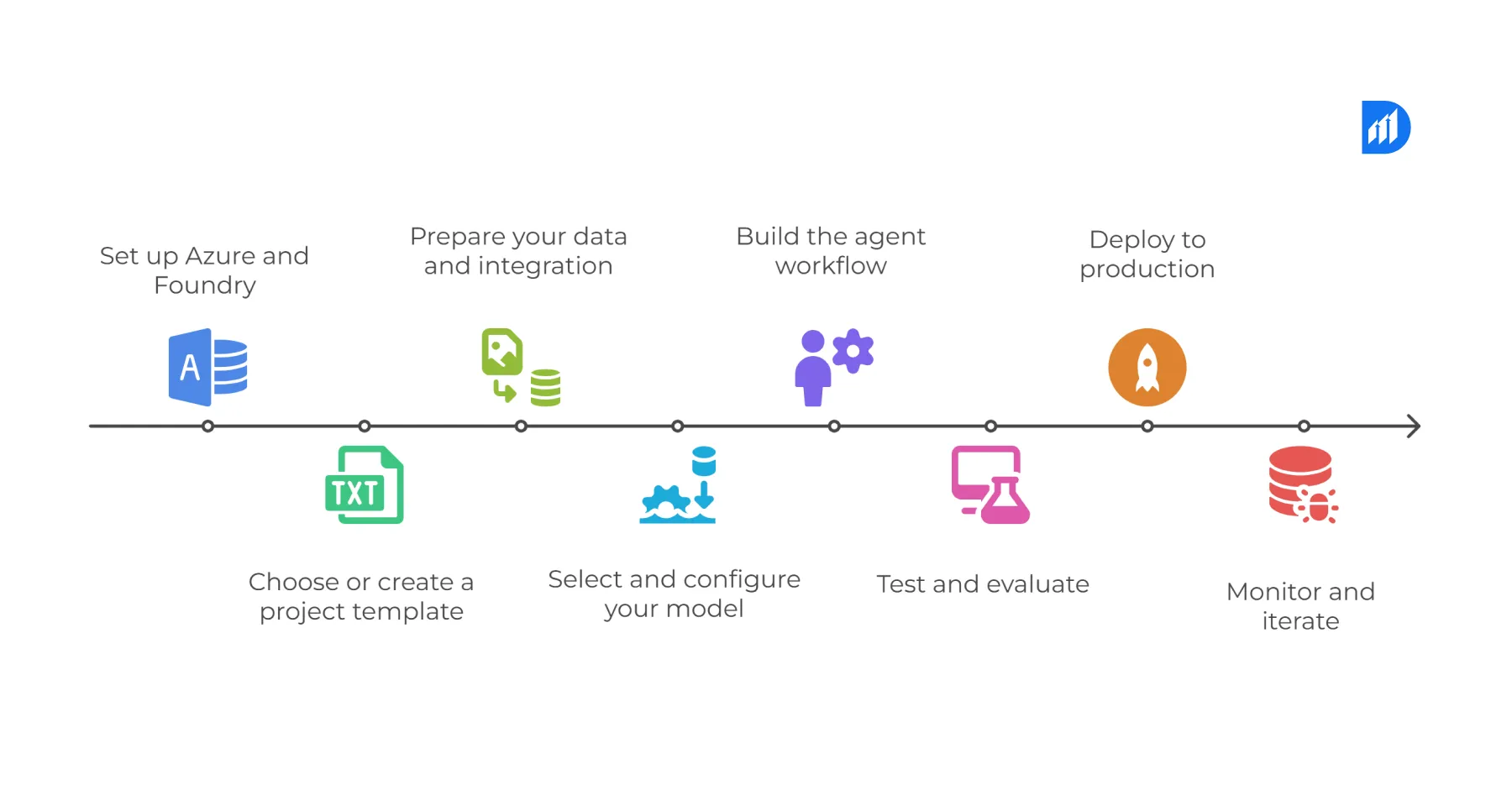
1. Set up Azure and Foundry.
Make sure you have an Azure subscription with Azure AI Foundry enabled. In the Azure portal (or via CLI), create a new Azure AI Foundry resource. This essentially registers your usage of Foundry.
Once that’s done, launch the Azure AI Foundry portal (ai.azure.com) and create a new project. Decide whether to use a “Foundry project” (default) or a hub-based one if your org has a shared workspace.
2. Choose or create a project template.
In the Foundry portal’s left pane, go to Templates (Preview). Browse the available solution templates: for example, “AI chat”, “AI agents”, or “Conversational agent”.
Select a template that matches your scenario. Templates come with sample code and architecture diagrams on GitHub. Open the template, and optionally fork or clone the repo into your development environment.
3. Prepare your data and integration.
A good copilot needs knowledge. Identify your data sources (documents, knowledge bases, databases, etc.). For RAG-style agents, set up an Azure AI Search index or similar to store vector embeddings of your data.
Connect your data – this might involve uploading documents, configuring a connection to Azure Data Lake, SharePoint, or other stores.
Also, configure any external APIs or services your agent will use (e.g., Cognitive Services for image/speech, company APIs for business logic). In code, you’d specify these data connections (the templates usually include instructions).
4. Select and configure your model.
Open the Azure AI Foundry “Models” section or the SDK to choose an LLM. For a simple assistant, you could start with a pre-trained model like GPT-4o or Llama 3.
If needed, use Foundry to fine-tune the model on your company’s documents or add a retrieval-augmented layer (RAG) so it’s grounded in your data.
Azure’s model catalog (Foundry Models) simplifies this – you just pick a model and hit “deploy” (Foundry can provision GPU-backed endpoints under the hood).
5. Build the agent workflow.
Now define how the copilot will behave. In Azure AI Foundry, this is done by designing an agent, essentially a sequence of steps and actions. Using the Foundry Agent Service, create one or more agents for your copilot.
You can attach the model you set up as the core LLM. Then add tools and actions: for example, a tool might query your Azure AI Search index for relevant docs, call an Azure Function to trigger a workflow, or interact with a REST API to fetch business data.
Microsoft’s Agent SDK (Semantic Kernel/AutoGen) is integrated here, so you can programmatically define prompts, functions, and logic. Quick-start agent templates are available to help get you going.
a. Test and evaluate.
With the agent built, use Azure AI Foundry’s built-in testing tools. Run a chat simulation or give the agent some queries. The portal has an evaluation feature where you can compare model responses, run prompts through safety filters, and iterate.
Adjust your prompts, tune your data connectivity, or swap models as needed. This stage ensures quality and helps catch any security or bias issues early. (Azure’s responsible AI features, like content safety filters, can be configured here).
b. Deploy to production.
When satisfied, deploy the copilot. In Foundry, deployment is often as simple as “publish” the project. Under the hood, Foundry will package your agent and model into a container or endpoint in Azure.
You can choose where it runs – Azure Container Apps, Azure Machine Learning, or even Azure Arc (for edge scenarios). Once deployed, the copilot exposes an API endpoint or UI hook. (For example, a web chat widget, a Teams app, or a custom integration.)
c. Monitor and iterate.
After deployment, leverage Foundry’s observability. The platform automatically logs usage and performance metrics.
You can revisit the Foundry portal to review how the copilot is doing: Are there errors? Which queries fail? Are there biases or hallucinations cropping up? Use this feedback loop to retrain or adjust. Continuous monitoring and refinement are key to a lasting copilot.
That’s the high-level process. In practice, each step has its own sub-steps (creating Azure resources, writing code, etc.), but Azure AI Foundry is designed to streamline this. The takeaway: you start with a plan, use Foundry’s unified tools (portal, SDK, templates), and very quickly have a working copilot in your hands.
“With this [release], Foundry truly becomes a one-stop shop. You can host a single agent or orchestrate a group of agents and connect them to other services using Model Context Protocol or OpenAPI. Quick-start templates, VS Code integration, and GitHub workflows shorten the journey from idea to production to minutes instead of weeks.
Benefits of enterprise AI copilots built with Azure AI Foundry
Why go through all this effort? What tangible benefits do you get from deploying custom AI copilots with Azure AI Foundry? From our experience and from customer stories, the gains fall into a few key areas:
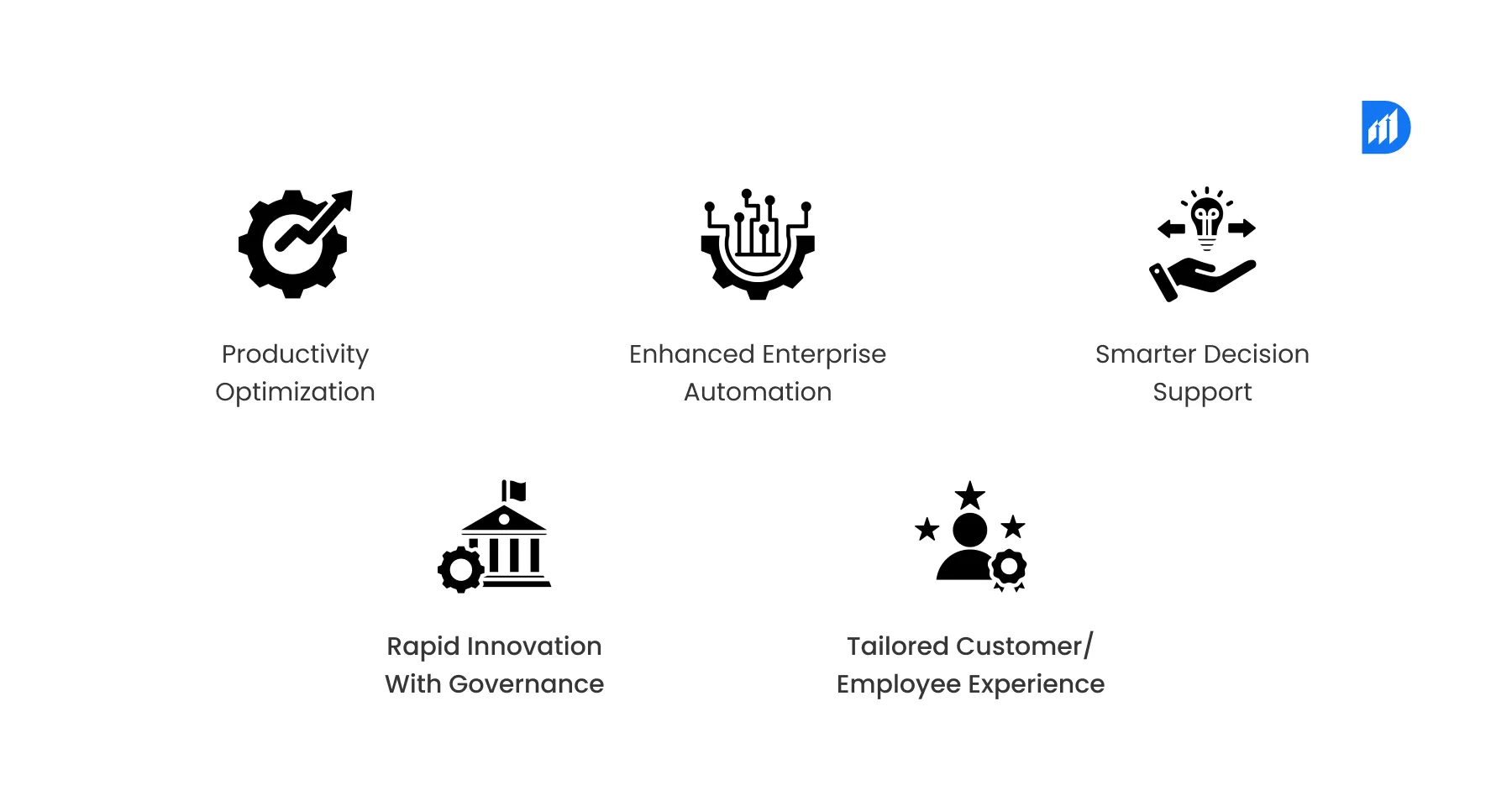
1. Productivity Optimization:
A well-built copilot automates routine tasks and surfaces information instantly. For example, Sweco – a major engineering firm – built an internal copilot (SwecoGPT) on Azure AI Studio and found that half of their employees used it and reported increased productivity.
Their consultants quickly generate and analyze documents, so they spend less time digging through files and more on creative engineering.
In short, copilots free up employee time and mental bandwidth. (Think: instant summaries of meeting notes, draft reports auto-generated from your data, or bots that take care of scheduling or translation.) This translates directly to productivity gains and often lower costs.
2. Enhanced enterprise automation:
Azure AI Foundry doesn’t live in a silo – it’s built to integrate deeply with the Azure ecosystem. That means your copilot can tie into existing enterprise workflows. Want the copilot to update a CRM entry after a customer call? Hook it to Azure Logic Apps or Functions through the Agent Service.
Need to use Azure Cognitive Services (vision OCR, speech recognition, language translation) as part of an assistant? You can. Foundry lets the copilot call on these cognitive skills and enterprise systems (ERP, databases) as action tools.
The result is truly end-to-end automation: the copilot isn’t just answering questions, it’s actively orchestrating tasks across systems.
This level of workflow automation can revolutionize processes – for instance, financial teams can automatically generate draft invoices, HR can auto-screen and summarize resumes, or support teams can classify and escalate tickets without manual triage.
3. Smarter decision support:
Enterprise copilots can act like virtual analysts. They can ingest large datasets or transcripts and extract insights.
Azure AI Foundry includes capabilities for content understanding and search that enable this. For example, a contact center could use AI Search and conversational data analytics to surface trends from customer calls.
By embedding analytics and summarization in the copilot, your teams have an always-on assistant that highlights anomalies, suggests answers, and prepares data-driven reports. Rhetorically:
Ever wish your system could say, “Hey, 20% of tickets this week mentioned shipping delays”? A proper copilot built with Foundry can.
4. Rapid innovation with governance:
Building AI into the enterprise often raises security and compliance concerns. Azure AI Foundry addresses this by providing a trustworthy foundation.
As Microsoft emphasizes, it’s built “enterprise-grade from the ground up”. Your data stays in your Azure tenant and can be encrypted with customer-managed keys. Role-based access control (RBAC) is enforced on every artifact.
Azure’s Responsible AI toolkit (safety filters, content classification) is integrated, so you’re protected against offensive or risky outputs. In practice, this means IT leaders can greenlight copilot projects knowing they have company IT policies covered.
The benefit? You can innovate fast without compromising on security or compliance.
5. Employee experience:
Ultimately, a copilot enhances user experience. Whether it’s a sales rep asking natural-language queries on a phone or an employee chatting with an assistant to get a report, the result is a more intuitive interaction.
Copilots can speak in your industry’s language because you trained them that way, using RAG or fine-tuning. A banking copilot understands KYC terms; a manufacturing copilot knows product codes.
And because Foundry supports multi-modal and advanced conversational understanding, these assistants can combine text, vision, and speech – for example, analyzing an image or answering questions about a chart.
The bottom line: happier users and better outcomes.
In summary, the benefits of Azure AI Foundry copilots include enterprise automation, productivity optimization, and enhanced AI-powered assistant capabilities, all delivered on a single integrated platform.
And because Foundry scales, these gains extend to the whole organization: you can start with one department’s copilot and then roll out more widely, refining as you go.
Closing Thoughts
Custom AI copilots are no longer science fiction. With platforms like Azure AI Foundry, building enterprise-grade assistants has become practical and surprisingly accessible. Foundry’s unified portal and toolchain let us apply advanced AI agent frameworks without needing an army of data scientists or endless integration projects. Instead, we get a guided end-to-end experience: choose models, connect data, orchestrate agents, and go live, with monitoring and governance baked in.
Of course, no technology is a magic bullet – designing a good copilot still requires careful planning, high-quality data, and ongoing refinement. But the heavy lifting is done.
As one Azure AI Foundry developer put it, they could go from “proof-of-concept to production in minutes instead of weeks” thanks to Foundry’s tooling. In our own projects, we’ve seen how a well-crafted copilot can turn grueling tasks into simple prompts, freeing experts to focus on high-level work.
Imagine: instead of digging through spreadsheets, your team asks a copilot, “What are the top 3 risks in our portfolio?” and gets an instant summary. Or a salesperson queries, “Show me customers who might upgrade to our new service,” and it happens via a single chat. This is not far-fetched — it’s what our clients are building today on Azure AI Foundry.
So if you’re an IT leader or architect looking to inject cutting-edge AI into your organization, consider the power of custom AI copilots. With Azure AI Foundry, you have a robust foundation to make those copilot dreams a reality.
It’s an exciting time to be at the intersection of AI and enterprise automation – and we’re just getting started.
Feel free to reach out to us to bring these smart assistants to your team.
Recent Blog

Asset Management Software for CFOs: From Depreciation to Capital Planning
September 29, 2026-
Why Voice AI Is Different From Chatbots in Recruitment?
September 17, 2026